An office vending machine is easy to underestimate. The cabinet may look like the biggest decision, but the real result comes from matching capacity, product dimensions, refrigeration, payments, restocking, and service to the way the workplace actually uses the machine. For most offices, I’d choose a refrigerated snack-and-drink combo with cashless payment, connected reporting, and enough lane depth to cover the busiest products without forcing daily refills. Published Zhongda Smart reference models currently start at $1,625 for a compact 36-SKU machine and move above $2,000 for larger combo configurations, before freight, payment hardware, inventory, and site work. This guide lays out the numbers that matter, the products that usually deserve space, the setup details buyers miss, and a practical way to judge payback without pretending every office behaves the same.
How Much Does an Office Vending Machine Cost?
The shortest useful answer is this: a commercial office setup usually costs more than the machine price printed on a product page. The cabinet is the starting point. Payment hardware, freight, final placement, first inventory, connectivity, electrical work, and spare parts determine what the machine actually costs to put into service.
Zhongda Smart’s current published product pages give useful factory-price reference points. The compact ZD-C-7 is listed at $1,625, the ZD-L-0 snack-and-drink combo at $2,002, and the 22-inch ZD-L-22 at $2,228. Those figures are product-page references, not final project quotations. Payment choices, cabinet branding, cargo-lane changes, software requirements, order quantity, and shipping can change the final number.
| Cost Layer | Planning Allowance | What Usually Moves the Number |
|---|---|---|
| Machine hardware | About $1,600 to $4,500+ | Cabinet size, refrigeration, screen, delivery system, capacity, controller |
| Payment & connectivity | $0 to $800+ | Reader, payment module, processor setup, telemetry, data plan |
| Freight & placement | $400 to $1,500+ | Weight, final-mile handling, stairs, elevator access, inside placement |
| Opening inventory | $300 to $1,000+ | SKU count, product cost, cabinet depth, fresh-food share |
| Site preparation | $0 to $1,000+ | Outlet work, floor protection, network work, signage, access preparation |
Those planning allowances are not quoted market averages; they are a practical budgeting framework for comparing complete projects. If a building already has a suitable outlet, easy loading access, and a stable network, deployment can stay lean. If the machine has to be moved through tight corridors, placed upstairs, fitted with a new payment system, or supplied with custom graphics, the difference between factory price and installed cost grows quickly.
I’d compare quotations on deployed cost, not cabinet cost. A machine priced $300 lower can become the more expensive choice when the quote excludes the card reader, spare motors, telemetry access, or inside delivery. Ask the supplier to mark every optional item instead of leaving the buyer to discover missing pieces during installation.
Where the money is worth spending
Refrigeration, reliable payment hardware, product-compatible lanes, and serviceable components usually deserve budget before cosmetic upgrades. A larger display can improve merchandising, but a 22-inch screen will not compensate for a bottle lane that jams or a payment reader that loses connection during a busy break.
Energy use also belongs in the cost discussion. ENERGY STAR reports that certified refrigerated beverage vending machines are, on average, 9% more energy-efficient and save about 1,000 kWh annually compared with standard models.[1] Actual use varies by machine, ambient conditions, refrigeration load, lighting, and power-management settings, but that figure is a good reminder that purchase price is only one part of ownership cost.
Get a machine configuration based on the products you actually plan to sell.
Send Zhongda Smart your product sizes, expected capacity, payment requirements, refrigeration needs, and branding preferences. A configuration built around the merchandise is more useful than a generic quote built around cabinet size alone.
Get a Factory ConfigurationWhich Machine Type Fits an Office?
For a normal workplace with mixed snack and beverage demand, I’d rank a refrigerated combo machine first. It puts cold drinks, packaged snacks, bars, and a few rotating products into one footprint and gives the operator one payment system, one service point, and one inventory view. That combination is difficult to beat when floor space is limited.
A separate beverage machine starts to make sense when cold drinks dominate sales and the office regularly empties bottle or can rows before snack rows move. A compact machine works when the location is small, the product mix is narrow, or the unit is meant to support a larger break area rather than serve as the only refreshment point. Elevator delivery is useful for fragile merchandise, but it is unnecessary complexity for many ordinary chip, candy, bar, and plastic-bottle programs.
| Machine Type | Good Fit | What It Does Well | Tradeoff |
|---|---|---|---|
| Compact machine | Smaller teams, secondary floors, compact goods | Lower footprint and lower opening inventory | Less depth for fast-moving drinks |
| Snack & drink combo | Most general office programs | Broad assortment from one cabinet | Lane layout must match actual packages |
| Beverage machine | Drink-heavy demand | High cold-drink depth | Narrower food choice |
| Fresh-food machine | Meal replacement and chilled food | Higher utility during meal periods | Short shelf life and tighter controls |
| Elevator vending | Fragile, boxed, or premium products | Gentler delivery | Higher mechanical complexity |
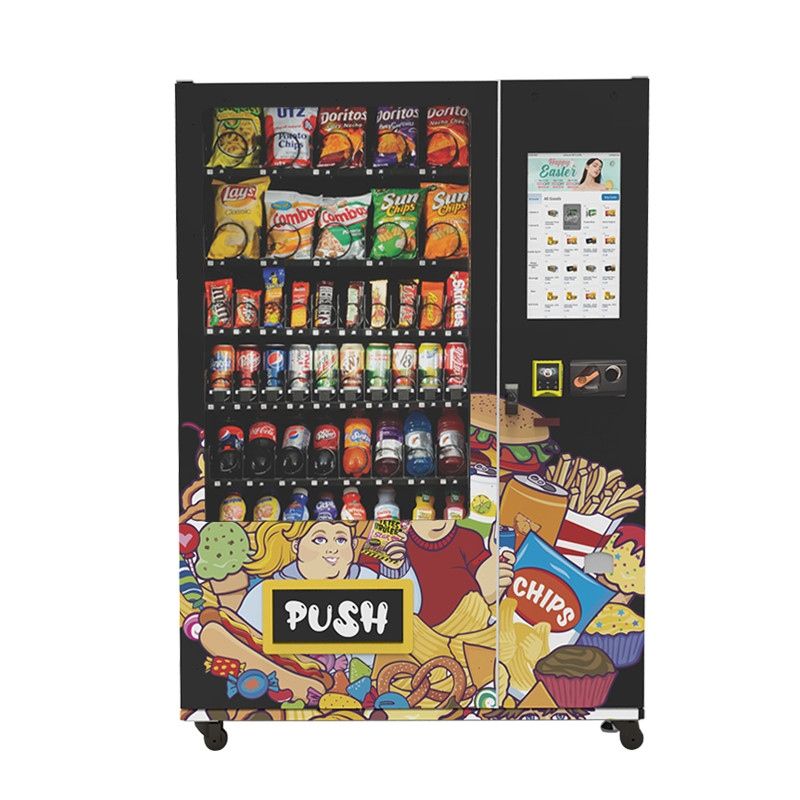
The important distinction is not “basic” versus “smart.” It is whether the machine architecture fits the goods and the service pattern. The ZD-L-22 snack-and-drink configuration, for example, publishes 60 standard cargo lanes, 300–360-item capacity, 4G/Wi-Fi/LAN connectivity, cash and card support, and a 22-inch screen. A buyer who only needs thirty compact products and very light daily volume would be paying for capacity that may sit unused. A busy office that sells fifty or sixty items a day could find the same capacity entirely reasonable.
If I were choosing for a first installation, I would rather leave a little room for growth than buy the largest cabinet available. Oversizing creates three hidden costs: more inventory tied up in the machine, more slow products needed to make the shelves look full, and a larger delivery problem. Undersizing is easier to spot because the best-selling lanes keep emptying. Oversizing can quietly drain cash for months.
What Should You Stock in an Office Vending Machine?
The product mix matters more than most equipment features after the first week. Employees see the same machine repeatedly, so weak products become obvious. A public vending location can survive on one-time impulse traffic. An office machine has to earn repeat purchases from people who already know what is inside.
I’d start with a dependable core, then let sales data reshape the cabinet. Water, familiar cold drinks, salty snacks, bars, nuts, chocolate, cookies, and one or two better-for-you options usually give a new machine enough variety without turning the first planogram into a guessing contest. A rotating section is useful, but it should not consume the space needed by products that reliably sell every week.
| Starting Share of Selections | Category | Examples | Why It Earns Space |
|---|---|---|---|
| 35–45% | Cold beverages | Water, sparkling water, tea, soda, juice, functional drinks | Frequent repeat demand and clear price comparison |
| 20–30% | Savory snacks | Chips, popcorn, crackers, pretzels | Strong break-time and meal-adjacent demand |
| 10–20% | Bars, nuts & protein | Protein bars, granola, nuts, dried fruit | Adds higher-value and more filling choices |
| 10–15% | Sweets | Chocolate, candy, cookies | Reliable impulse and treat purchases |
| 5–10% | Rotation / essentials | Seasonal items, gum, mints, cables, small personal items | Creates testing space without displacing the core assortment |
This is a launch mix, not a permanent recipe. If sparkling water outsells regular soda two to one, the machine should reflect that. If a premium protein bar sells slowly but has strong repeat buyers, keep one lane instead of giving it three. The point is to make the assortment progressively more specific to the office rather than forcing every location into the same shelf plan.
Package shape deserves almost as much attention as flavor. A soft chip bag, a rigid candy box, a tall slim can, and a wide plastic bottle do not behave the same way in a spring lane. Product dimensions also change real capacity. A machine listed for 300–360 pieces may hold far fewer if most products are bulky bottles or wide bags. Capacity claims only become useful after the merchandise is known.
Cold beverages usually need more depth than more variety
Office buyers often overestimate the value of twenty different drinks and underestimate how quickly two or three favorites can empty. If water, one soda, one zero-sugar drink, and one energy drink dominate demand, giving those products deeper availability is usually better than dedicating one facing each to a long list of slow flavors.
Three price levels work well for beverages because they give customers an easy choice without making the cabinet feel confusing: basic hydration, mainstream flavored drinks, and a premium functional or specialty option. The exact products can change, but the logic is useful. A customer who only wants water should not have to pay premium-drink pricing, while a higher-priced option gives the machine room for stronger margin where demand supports it.
Healthy choices need normal retail discipline
A “healthy section” fails when it is stocked as a gesture rather than as retail. Nuts that are stale, bars that cost much more than neighboring candy, or unfamiliar products hidden in a bottom row will not sell simply because they have a better nutrition profile. Better-for-you products still need recognizable packaging, fair pricing, good placement, and enough demand to turn before the date code becomes a problem.
NAMA’s current industry census describes workplace convenience services as a mix that continues to evolve toward tech-enabled and health-forward offerings.[3] That direction fits what an office program should do anyway: give employees useful choices, then keep the choices that move. I’d test a small set of nuts, protein bars, lower-sugar drinks, and sparkling water before dedicating a large percentage of the machine to products that have not yet proved themselves.
Fresh food changes the operating model
Fresh meals can make an office vending machine much more valuable, especially where employees have limited access to food during the workday. They also introduce short shelf life, temperature control, date rotation, waste, and a higher service burden. Sandwiches, salads, dairy products, fruit cups, and similar items should not be treated like chips with refrigeration added.
If I were choosing for a first-time program, I would stabilize the packaged snack-and-drink operation before adding a broad fresh-food menu. Once refill timing, refund handling, temperature monitoring, payment settlement, and sales reporting are routine, fresh products become easier to manage. Starting with too many perishable SKUs makes it hard to tell whether losses come from poor demand, weak forecasting, or the machine itself.

Non-food essentials can also earn a few slots. Charging cables, earbuds, pens, notebooks, stain-removal wipes, personal care items, and similar small goods may sell less often than snacks but solve urgent problems. I’d keep those products visually grouped so the machine still reads clearly as a food-and-drink point rather than a random collection of merchandise.
How Much Capacity Do You Need?
Headcount is a useful starting number, but it is not the number I would size the machine from. The better number is how many people are physically present during a normal day. A workplace with 300 employees on payroll and 150 present may create less demand than a smaller site with long shifts and nearly full daily attendance.
For this guide, I’m using a simple planning framework that Zhongda Smart buyers can apply before asking for a cabinet size:
Zhongda Smart Office Vending Capacity Model
Expected daily vends = people on site × buyer participation × items per buyer
Example: 140 people present × 42% buying participation × 1.25 items = about 74 vends per day. If only 70% of a 140-person workforce is normally on site, use 98 people as the starting attendance figure, not 140.
This is a planning model, not an industry standard. Its value is that every assumption is visible. If the site has employer subsidies, long shifts, limited food nearby, or a strong afternoon beverage habit, participation can be much higher. If employees bring lunch and have free drinks in the kitchen, vending participation can be much lower.
Total capacity is only half of the sizing problem. The other half is capacity by winning SKU. A 300-item cabinet is not effectively “full” if the two best-selling water rows empty after two days. That is why stockout reports often reveal more than the headline capacity number.
| People Regularly Present | Starting Point | What I Would Watch |
|---|---|---|
| Under 50 | Compact machine or narrow assortment | Whether sales justify refrigeration and full cabinet depth |
| 50–100 | Compact combo or standard combo with conservative first fill | Which drink and snack rows need extra facings |
| 100–250 | Full-size snack-and-drink combo | Peak-day stockouts and refill interval |
| 250–500 | One high-capacity point or two distributed machines | Walking distance, lines, and whether one cabinet becomes a bottleneck |
| 500+ | Multiple vending zones with centralized reporting | Route efficiency, refill sequencing, and machine-level assortment differences |
The table is a starting point, not a promise. Two offices with the same headcount can produce very different sales. The most reliable sizing decision comes after four to eight weeks of real transaction data. Before that, choose enough capacity to avoid obvious stock pressure without filling every available lane with speculative inventory.
A useful rule is to size the cabinet for the service interval you can actually support. If the person responsible for restocking can only visit twice a week, the winning products need enough depth to survive the gap. If someone is already in the building every day, a smaller machine can work because replenishment is cheap. Capacity is partly a hardware decision and partly a labor decision.
Placement, Power, Delivery & Setup
Installation problems usually begin before the truck arrives. The final floor space is rarely the only measurement that matters. Doorways, elevator openings, hallway turns, thresholds, ramps, ceiling clearances, and the narrowest point on the delivery path can stop a machine that technically fits the room.
The ZD-L-22 is a useful example because its current specification lists H1990 × W1315 × D920 mm and 380 kg. That is large enough that I would confirm the complete delivery route before approving shipment. The machine should also have the manufacturer-specified service and ventilation clearance after it is placed; a cabinet that fits only when pressed tightly against a wall is not truly a good fit.
Placement affects sales as much as installation. The strongest location is usually already part of the employee routine: near a break area, coffee point, lunch seating, shared corridor, or common room. A machine hidden in a quiet utility corner may have perfect power and terrible usage. Convenience is the product, so the machine needs to sit where people naturally pass it.
Noise matters too. Refrigeration compressors, condenser fans, vending motors, relays, and pickup doors create normal operating sound. A refrigerated office vending machine is better beside a break zone than beside desks where quiet work is expected. It also rejects heat into the room, another reason not to trap it in a poorly ventilated closet.
A commissioning sequence that catches problems early
I would not treat delivery day as the finish line. Treat it as commissioning. Confirm the cabinet is stable and level, follow transport instructions before starting refrigeration, bring the machine to operating temperature, connect payment and telemetry, map every SKU to its correct selection, then test every lane with real products.
Testing one row is not enough. A flexible snack bag may vend perfectly when a lane is full and fold when only one package remains. A bottle may clear the shelf but strike another product on the way down. A card reader may look online while settlement or refund behavior is still configured incorrectly. End-to-end testing is worth the time because the first few employee purchases set confidence in the whole program.
- Confirm ownership and responsibilities. Know who stocks, cleans, prices, handles refunds, receives settlements, and calls for repair.
- Freeze the opening product list. Record dimensions, weight, purchase cost, sale price, and temperature requirement for each SKU.
- Verify the configuration sheet. Cabinet, shelves, payment, network, refrigeration, screen, branding, and accessories should match the order.
- Inspect the delivery route. Measure the path, not only the final wall.
- Position and level the cabinet. Leave required service and airflow clearance.
- Stabilize refrigeration. Follow the model instructions and confirm temperature before loading sensitive products.
- Set payment and connectivity. Complete live transactions, cancellations, and the refund process.
- Load and map inventory. Keep a photo of the opening planogram.
- Test every selection. Include full-lane and low-stock tests for packages that are difficult to vend.
- Record the baseline. Save serial number, settings, opening quantities, support contacts, and machine photos.
Electrical requirements need the same discipline. Confirm the nameplate voltage, plug type, rated power, grounding, and circuit capacity for the exact machine being delivered. If new electrical work is needed, use a qualified electrician. Extension cords and temporary adapters are not a sensible permanent installation plan for commercial refrigerated equipment.
Network planning is easy to overlook because Wi-Fi appears simple on paper. Office networks may use captive portals, rotating passwords, device isolation, certificate rules, or firewalls that are unfriendly to unattended devices. Cellular connectivity can be cleaner for some deployments because it separates payment and telemetry from internal network policy. If Wi-Fi is used, test reconnect behavior after a router restart and after the machine has been idle.
Cashless Payment & Remote Management
Cashless payment has a practical advantage in an office: employees are more likely to have a phone or card than exact cash. The operational benefit can be even larger. Removing cash removes coin inventory, bill jams, change management, cash collection, and a layer of reconciliation work.
“Cashless” is not one feature. It is a chain that includes the reader, controller interface, network connection, payment processor, settlement account, transaction fees, software, and refund process. A machine can accept a tap and still be a poor operating choice if settlement data is unclear or replacement hardware is difficult to obtain.
Before approving a payment setup, I’d want clear answers to these questions:
- Which card, contactless, mobile wallet, or QR methods are supported?
- How does the payment hardware connect to the vending controller?
- Who provides transaction processing?
- What fixed, percentage, gateway, software, or data fees apply?
- How often are funds settled?
- What happens when the connection drops during a purchase?
- How are failed vends and refunds handled?
- Can the operator see item-level sales rather than only total revenue?
- Does the system provide sold-out or low-stock alerts?
- Can sales data be exported for purchasing and accounting?
Remote vending management becomes more valuable as the number of machines increases. For one machine, a low-stock alert may be enough. For ten machines, the system should help decide which cabinet needs a visit first. The best route is not the route that visits every machine on the same day; it is the route that visits the machines that actually need inventory or service.
Inventory data also changes product decisions. A row that sells out every Tuesday should receive more depth or an earlier refill. A product that sells three units a month should not keep occupying a high-visibility lane because someone likes the package design. Once connected sales data is available, the planogram can become evidence-based rather than opinion-based.
I think the most useful remote features are often the least flashy: machine online/offline status, transaction reporting, sales by selection, inventory alerts, and temperature alerts on refrigerated units. Advanced dashboards are welcome, but the first job of software is to prevent empty best sellers, missed outages, and unnecessary service trips.
Sales, Margins & Payback
An office vending machine can make money, but the hardware does not create the return by itself. Daily transactions, product cost, payment fees, waste, labor, utilities, connectivity, and repair expense decide the result. A machine with modest traffic can look attractive when only gross sales are considered and disappointing once the operating costs are included.
The cleanest way to look at performance is monthly operating contribution:
Sales − product cost − payment fees − spoilage − service labor − utilities/connectivity − site fee = operating contribution
That number is not the same as final business profit if financing, taxes, insurance, depreciation, storage, management time, or shared overhead sit elsewhere. For an employer that owns one internal machine, some of those costs may be absorbed by the business. For an operator running many machines, they belong in the larger financial model.
What the numbers look like at different daily sales levels
The table below is an illustration, not an industry benchmark. It assumes an average selling price of $2.25, product cost equal to 50% of sales, payment expense equal to 4% of sales, spoilage and shrink equal to 2%, twenty-two active workdays per month, $55 in monthly connectivity and utilities, a fixed $250 monthly service-labor allowance, and a $4,500 deployed equipment investment.
| Daily Vends | Monthly Sales | Illustrative Monthly Contribution | Illustrative Payback |
|---|---|---|---|
| 20 | $990 | About $131 | About 34 months |
| 35 | $1,733 | About $457 | About 10 months |
| 50 | $2,475 | About $784 | About 6 months |
| 75 | $3,713 | About $1,329 | About 3.5 months |
At twenty sales a day, the economics are thin. At fifty, the same installation has enough transaction volume to absorb fixed connectivity and service costs much more comfortably. That is why I’d rather place the right-sized machine in a proven fifty-sale location than overspend on capacity for a location that struggles to reach twenty.
Margin percentage is only one lens. Margin dollars per slot can be more useful. A premium bar may have a strong percentage margin but sell twice a week. A bottle of water may carry a lower percentage margin and sell twenty times. The shelf has finite space, so the better question is how much contribution each lane produces over a week or month.
Stockouts deserve a financial value too. If a best-selling drink row is empty for two days every week, the problem is not only lost unit sales. Customers learn that the machine is unreliable and may stop checking it. That behavior is difficult to win back. Keeping the top ten products available is usually more important than adding ten more experimental SKUs.
For employer-supported vending, the financial goal may be different. Some companies subsidize pricing, give employees credits, or treat refreshments as a workplace benefit. In that case, I’d still track product-level usage. The machine may not need to maximize gross margin, but it should still minimize waste and spend the subsidy on items employees actually choose.
There are several ways to improve payback without simply raising every price:
- Give high-velocity products more facings so they stay available.
- Remove slow items before they age into waste.
- Use different margin targets by category instead of one markup rule for everything.
- Reduce unnecessary refill trips with inventory alerts.
- Track failed payments and mis-vends as a percentage of transactions.
- Buy inventory more efficiently after demand becomes predictable.
- Use small product tests rather than changing an entire shelf at once.
- Keep the machine clean and fully lit; presentation affects repeat use.
Buy, Lease, or Use a Vending Operator?
Buying gives the most control over pricing, products, branding, data, and the long-term machine configuration. It also creates the most responsibility. Someone has to purchase inventory, refill the cabinet, handle refunds, clean it, watch alerts, and arrange repair.
Leasing lowers the initial cash requirement but adds a fixed payment and contract terms. A full-service operator can remove most of the daily workload, although the office usually gives up some control over assortment, pricing, equipment, and reporting. None of the three models is automatically better; the right choice depends on whether the workplace wants to run a small unattended retail operation or simply provide an amenity.
| Model | Opening Cash | Control | Operating Work | Best Fit |
|---|---|---|---|---|
| Buy | Highest | Highest | Highest | Owners who want data, pricing, branding, and product control |
| Lease | Lower | Medium to high | Medium to high | Programs that prefer monthly equipment expense |
| Full service | Often lowest direct equipment outlay | Lower | Lowest | Offices that want the service without running the machine |
For a full-service proposal, the contract deserves as much attention as the cabinet. Look at response time for outages, product-change flexibility, minimum sales conditions, reader replacement, refund responsibility, service frequency, and what happens if the office wants the machine removed. A “free machine” can be expensive in a different way if the service is weak and the office has little control.
How to Compare Vending Machine Manufacturers
A useful manufacturer conversation starts with the products, not the brochure. Package size, filled weight, refrigeration need, payment method, expected daily sales, available floor space, and restocking interval all affect the final machine. If a supplier recommends the same cabinet before asking what will be sold, I would keep asking questions.
For this comparison, I’m prioritizing three things: product compatibility, serviceability, and configuration clarity. Screen size and exterior styling matter, but they come after the machine can dispense the merchandise consistently and be repaired without turning a small component failure into a long outage.
A serious quotation should identify the exact model, cabinet dimensions, packed dimensions, machine weight, tray or lane layout, refrigeration range, rated power, plug specification, payment hardware, network options, remote-management functions, spare parts, warranty scope, production timing, packaging method, and customization included in the price.
Ask how the factory confirms product fit. For unusual packaging, a sample vend or documented test is worth more than a general statement that “the machine can sell anything.” Flexible bags can fold. Narrow bottles can tilt. Wide bottles can rub neighboring lanes. Light cartons can double-vend. A custom vending machine project becomes much easier when the product dimensions are known before the shelves are finalized.
Zhongda Smart’s OEM and custom vending machine program lists customization around branding, payment integration, structure, software, and configuration, with many models available from a one-unit starting quantity. In my view, the strongest use of factory customization is not cosmetic. It is aligning the internal machine with what the operator actually intends to sell.
What I would put on the quotation request
- Product list with package length, width, height, and filled weight
- Required number of selections and expected quantity per best-selling SKU
- Chilled versus shelf-stable products
- Preferred card, contactless, cash, or QR payment setup
- Network preference: cellular, Wi-Fi, LAN, or a combination
- Screen requirement and any advertising content
- Cabinet branding files and finish preferences
- Available installation footprint and delivery-path limits
- Desired spare-parts package
- Expected order quantity and deployment schedule
Factory testing should be specific enough to be useful. For a snack-and-drink machine, I would want power-on checks, cooling checks, payment communication, controller communication, lane testing, door and lock inspection, display inspection, and a final configuration record. For difficult products, a short video of the actual package vending from the intended lane can prevent arguments after delivery.
Service documents matter after the sale. Ask whether wiring diagrams, error-code guidance, controller instructions, parts identification, and remote technical support are available. A machine does not need to be complicated to become expensive when the operator cannot identify a simple failed motor or sensor.
Not sure which cargo-lane layout fits your products?
Package width, height, weight, and stiffness can change the right dispensing setup. Send the product dimensions before ordering and Zhongda Smart can review the machine configuration around the actual merchandise.
Send Product DimensionsZhongda Smart Reference Configurations
Specifications become more useful when they are read as a system instead of a list. A larger screen changes door structure and wiring. Refrigeration changes power and airflow. More cargo lanes affect product width. Payment devices occupy front-panel space and require controller integration. Connectivity adds hardware and software. Every major option competes for space, power, cost, and service access inside the same cabinet.
The current Zhongda Smart catalog gives three useful reference points for office planning. They are not three steps in a required upgrade path; they simply show how different machine formats solve different capacity and interface problems.
| Reference Model | Published Price | Published Capacity | Configuration Notes |
|---|---|---|---|
| ZD-C-7 | $1,625 | 36 SKUs / up to 300 small boxes | H1954 × W800 × D850 mm, 7-inch touchscreen, 4G/Wi-Fi/LAN, cash/card listed |
| ZD-L-0 | $2,002 | About 300–360 products | H1990 × W950 × D920 mm, adjustable 2–25°C, 4G/Wi-Fi, multiple payment configurations |
| ZD-L-22 | $2,228 | About 300–360 products | H1990 × W1315 × D920 mm, 22-inch display, 60 standard lanes, 4G/Wi-Fi/LAN |
Published prices and specifications can change, and final capacity depends on package dimensions. The important comparison is what each layout gives up to gain something else. The ZD-C-7 narrows the cabinet to 800 mm and targets compact boxed goods. The ZD-L-0 keeps a large snack-and-drink reserve in a cabinet without a large touchscreen. The ZD-L-22 gives more front-panel display space and a published 60-lane layout.

This is where manufacturer data can prevent a poor buying decision. A buyer who needs a large touch interface for product images and promotions may accept the wider cabinet. A buyer who wants a straightforward employee snack point may prefer a simpler front panel. A buyer selling mostly small boxed essentials may not need a large refrigerated combo at all.
Zhongda Smart Factory Note
The machine should be configured around the merchandise before production is finalized. Product dimensions, packaging type, payment method, temperature requirement, network environment, and branding all affect the final setup. “Capacity” on a specification sheet is a reference until the actual packages are mapped to the lanes.
Restocking, Food Safety & Maintenance
Once the machine is live, the operating routine matters more than another feature on the specification sheet. A connected cabinet still performs poorly if nobody rotates dates, cleans the pickup area, responds to failed payments, or notices that the same beverage lane sells out every week.
During the first month, I’d check the dashboard daily and physically inspect the machine more often than the eventual long-term schedule. New locations produce noisy data: one meeting can create a sales spike, a product may sell out simply because the opening quantity was too low, and employees may need several days before the machine becomes part of their routine. The early goal is to catch failures and stockouts, not to optimize every SKU after forty-eight hours.
| Task | Starting Rhythm | What to Record |
|---|---|---|
| Remote status review | Daily | Payment online, stock alerts, temperature alerts, errors |
| Restock | 1–3 times weekly to start | Units added, empty lanes, damaged packages, unexpected demand |
| Date rotation | Every refill | Short-dated stock, removals, waste |
| Clean touchpoints & pickup area | Every visit or as needed | Spills, debris, damage, sticky doors |
| Cooling-system inspection | Per machine instructions | Dust, airflow, abnormal noise, temperature stability |
| Lane retest | After product changes or repeated mis-vends | Motor action, product release, sensor result |
Fresh food requires tighter controls. The FDA Food Code is a model document used for retail and food-service safety, including vending operations. Its vending provisions address time/temperature-control-for-safety foods and use 41°F (5°C) in the specified refrigerated vending conditions.[2] The exact rules that apply to a particular installation depend on the food and the applicable requirements, so the machine setting, product label, and food-safety procedures all need to agree.
For chilled products, do not rely only on what the controller says during initial setup. Verify cabinet temperature with an independent instrument, make sure air paths are not blocked by overfilled shelves, and decide in advance what happens after a temperature alarm or power interruption. A discard decision is much easier when the rule was written before the incident.
Vending machine repair is easier when there is a simple escalation ladder. Level one is observation: power, network status, door position, visible jams, and approved reader restart procedures. Level two is guided replacement of serviceable components such as a motor, sensor, lock, or payment module. Level three is trained technical work on refrigeration, mains electrical systems, or controller faults. Office staff should not be pushed into unsafe repair work simply because remote support is available.
A small spare-parts kit can be valuable when the machine is important to daily operations. The exact kit depends on the model, but it may include manufacturer-recommended motors, sensors, fuses, locks, or other replaceable items. The important point is not to stock a drawer full of random components; it is to know which parts can realistically shorten downtime.
The first month: what I would actually watch
In week one, watch failed vends, payment errors, obvious stockouts, and cooling stability. In week two, look at which lanes empty first. In week three, replace clear slow sellers and test a few requested products. In week four, set the normal refill interval, cleaning checklist, reorder points, and service routine. That is enough structure to make the program stable without pretending a new site can be fully optimized in thirty days.
After ninety days, the useful review is short: uptime, daily vends, contribution dollars, stockout rate, waste, service time per visit, payment failure rate, and recurring employee requests. If the cabinet is constantly empty, increase depth or service frequency. If it is always full, reduce inventory or question whether the machine is oversized. If sales are strong but margins are weak, work on purchasing and price architecture before blaming the equipment.
Mistakes That Cost Money
The most expensive vending mistakes are usually ordinary decisions made too early. A buyer chooses a cabinet before the product list is settled, accepts a payment setup without understanding fees, or fills every lane because an empty slot looks wrong. None of those choices feels dramatic at the time, but each can create months of extra labor or weak sales.
Buying the biggest cabinet “for future growth”
Unused capacity is not free. It occupies floor space, ties up inventory, and encourages the operator to add products simply to make the machine look full. I’d leave reasonable headroom, but I would not buy double the required capacity without a specific growth plan.
Using product names instead of package dimensions
“Water bottle,” “protein bar,” and “chips” are not dispensing specifications. Two bottles with the same volume can have different diameters and cap shapes. Two snack bags with similar weight can have very different widths and stiffness. Send actual dimensions and, for difficult products, physical samples or test packages.
Judging profitability by revenue alone
A machine that sells $3,000 a month can perform worse than a machine selling $2,300 if the first site has expensive inventory, high waste, heavy payment fees, and frequent service visits. Revenue is visible. Contribution is what pays back the equipment.
Adding too many products at launch
A new vending program does not need to prove its variety on day one. Give the best candidates enough depth, reserve a few slots for tests, and change slowly enough that the sales data means something. Replacing half the planogram every week creates motion without learning.
Putting the machine where space is available instead of where people are
A technically perfect location can be commercially weak. If employees have to make a special trip through a quiet hallway, the machine loses spontaneous purchases. A slightly tighter position near existing break traffic can be more valuable than a large empty wall far from the daily routine.
No visible refund path
A small failed vend can create outsized frustration. Put a clear support method on the machine and make refunds easy enough that employees do not have to chase several people for a small amount. More importantly, track the failure by lane and product. Repeated refunds are a repair signal, not a customer-service strategy.
No ownership of the machine after installation
Someone has to be the named owner of stock, cleaning, pricing, payment issues, and service. “Facilities,” “the office,” or “the vendor” is not specific enough. A reliable office vending machine usually has boring accountability behind it.
Comparing factories only on the first price
A low quote is useful only when it covers the same configuration. Ask what is included, what is optional, what spare parts arrive with the machine, what remote access costs, and what happens when a component fails. The cheapest first invoice can become an expensive operating model.
A Short Buying Check Before You Approve the Order
By the time a buyer reaches a final quotation, most of the important work should already be done. I’d want the following answers on one page before approving the machine:
| Daily demand | How many people are normally present, and what daily vend range is realistic? |
| Products | Are the opening SKUs, package dimensions, weights, and temperature needs known? |
| Capacity | Can the best sellers survive the planned refill interval? |
| Payments | Are hardware, processor, fees, settlement, refunds, and connectivity understood? |
| Site | Do the delivery path, power, floor space, service clearance, and network work? |
| Service | Who stocks, cleans, refunds, troubleshoots, and orders parts? |
| Cost | Is the number being approved a cabinet price or a complete deployed budget? |
If those seven lines are clear, most secondary decisions become easier. If several are still unknown, another round of specification work is usually cheaper than discovering the answers after the machine is built.
Office Vending Machine FAQ
How much does an office vending machine cost?
The machine itself can begin in the low four figures and rise with refrigeration, capacity, touchscreen size, payment hardware, specialized dispensing, and customization. As current factory reference points, Zhongda Smart lists the compact ZD-C-7 at $1,625, the ZD-L-0 snack-and-drink combo at $2,002, and the ZD-L-22 at $2,228. Those are published machine prices rather than complete installed budgets. Freight, final placement, payment setup, opening inventory, site work, connectivity, and spare parts can add materially to the project. For budgeting, compare the complete deployed configuration instead of choosing the lowest cabinet price.
What is the best vending machine for an office?
For a typical mixed-use workplace, I’d choose a refrigerated snack-and-drink combo with cashless payment and remote reporting. It covers the products most employees expect without requiring separate snack and beverage cabinets. Smaller offices or secondary floors may be better served by a compact machine, while very drink-heavy locations can justify dedicated beverage capacity.
How many employees do you need for an office vending machine?
There is no reliable fixed minimum. Use the number of people actually present each day, estimate what share will buy, and multiply by the average number of items per buyer. Then compare that demand with the refill schedule. A small office with high attendance and subsidized prices can outperform a much larger office with low daily attendance and free pantry drinks.
What products should go in an office vending machine?
Start with a dependable mix of cold beverages, savory snacks, bars or nuts, sweets, and a small rotating section. Give familiar best sellers enough depth. Test healthier products and premium items in limited slots, then expand only when sales support the decision. Package dimensions and stiffness should be checked before the final cargo-lane layout is confirmed.
Can an office vending machine be cashless only?
Yes. A cashless machine can support card, contactless, mobile wallet, QR, or account-based payments depending on the reader, controller, processor, and network setup. Before ordering, confirm payment fees, settlement timing, refund handling, offline behavior, and replacement-hardware support.
How often should an office vending machine be restocked?
Restock according to sales velocity rather than a fixed calendar. During the first weeks, check the machine frequently enough to learn which products empty first. Once demand stabilizes, many sites can move to one to three physical refill visits per week, while high-volume locations may need more. Remote stock alerts can reduce unnecessary visits.
Does an office vending machine need refrigeration?
Not always. Shelf-stable snacks, boxed goods, and durable essentials may not require cooling. Chilled beverages and time/temperature-control foods need a suitable refrigerated configuration and appropriate operating procedures. The required temperature should follow the product and applicable food-safety requirements, not a generic machine setting.
What information should I send for a custom vending machine quotation?
Send the product list, package dimensions and filled weights, required number of selections, expected quantity per high-volume SKU, refrigeration requirement, payment methods, network preference, screen requirement, branding files, installation footprint, delivery limitations, and order quantity. That information lets the manufacturer evaluate product channels and hardware before the final quotation instead of quoting a generic cabinet first.
Zhongda Smart OEM / ODM Vending Machines
Start with the products. Then choose the machine.
Share your product type, package dimensions, required capacity, payment method, cooling needs, and branding requirements. Zhongda Smart can use those details to prepare a more relevant machine configuration and quotation.
Discuss Your Vending ProjectAbout This Guide
This guide was prepared by the Zhongda Smart technical editorial team using current Zhongda Smart product specifications, machine-configuration criteria, and published external technical references. Product prices and specifications are reference information and can change as configurations are updated. Capacity figures depend on real package dimensions, and any final machine order should be confirmed against the products, payment hardware, electrical requirements, software, and installation conditions for that project.
Sources & Technical References
- ENERGY STAR — Vending Machines. Efficiency data for certified refrigerated beverage vending machines.
- FDA — Food Code 2022. Model food-safety provisions covering retail and vending operations, including refrigerated vending requirements.
- NAMA Foundation — State of Convenience Services Industry Census. Current research on vending, micro markets, office coffee service, pantry, and workplace convenience services.
- NAMA — Convenience Services Overview. Industry context on self-service retail, vending, workplace refreshments, and better-for-you offerings.
Disclaimer
This article is general equipment and business-planning information, not a financial, legal, electrical, accessibility, or food-safety opinion. Published prices, specifications, capacity, payment costs, energy use, operating expenses, sales, and payback can change and are not guaranteed. Financial examples are illustrations based on stated assumptions rather than performance promises. Confirm the final machine specification with the manufacturer, follow product and equipment instructions, use qualified professionals where required, and verify the rules that apply to the actual products and installation before operation.