A vending machine can arrive in perfect condition and still be wrong for the site. The cabinet may clear the entrance but fail to turn through a corridor. The outlet may be close enough but unsuitable for the finished electrical configuration. A card reader may work during bench testing and lose its connection once the machine is pushed into position. Refrigeration can also struggle when the condenser has nowhere to reject heat. A proper vending machine installation deals with those issues before the first unattended sale. The work covers the delivery route, floor, electrical supply, ventilation, network, payment system, product setup, leveling, cooling, and repeated test vends. This guide follows the order I’d use when reviewing a machine installation from factory specification through final commissioning.
Practical definition: A vending machine installation is complete when the cabinet is safely positioned, its electrical supply matches the finished configuration, ventilation and service access remain open, payment and connectivity work at the final location, and every active product selection has passed a real vend test.
Before Delivery: Make Sure the Machine Can Reach the Site
The final floor space is only one measurement. A full-size cabinet has to get from the unloading point to that space without damaging the machine, the building, or the people moving it. I’d approve the delivery path before approving the final cabinet dimensions.
Start at the point where the machine leaves the truck or loading equipment. Follow the real route through every doorway, corridor, ramp, elevator, threshold, corner, gate, and ceiling restriction. Record the narrowest width and the lowest overhead clearance. Sharp turns deserve extra attention because a cabinet that fits through a door straight on may not have enough room to rotate immediately afterward.
The packed machine can also be wider or taller than the bare cabinet. If the shipping crate cannot pass through the final entrance, decide in advance where safe unpacking will take place. That is much better than removing protective packaging in a doorway while a delivery team waits.
Get the final machine drawing, not a generic brochure dimension
Installation dimensions should come from the model and configuration actually being built. Touchscreen housings, card terminals, bill acceptors, advertising panels, side modules, lockers, refrigeration assemblies, and other options can change handling or clearance requirements.
A useful site sheet should record cabinet width, depth, height, machine weight, packed dimensions when available, door swing, required ventilation clearance, service access, electrical configuration, network method, payment hardware, intended product type, and final placement.
The difference between models is large enough that “standard vending machine size” is rarely useful for serious planning. Current Zhongda Smart specifications provide a clear example.
| Model | Cabinet Size | Listed Weight | Listed Power | Temperature Range | Connectivity | Installation Consequence |
|---|---|---|---|---|---|---|
| ZD-LS-22 elevator vending machine | 1380 × 920 × 1950 mm | 300 kg | 400 W | 4°C–25°C | 4G / Wi-Fi / LAN | Delivery access, elevator movement, cooling airflow, electrical supply, and front service space all need to be planned. |
| ZD-L-22 cashless vending machine | 1990 × 1315 × 920 mm | 600 kg | 20–580 W | 2°C–25°C | 4G / Wi-Fi / Ethernet* | The heavier cabinet changes handling requirements, while payment, network, and refrigeration configuration affect commissioning. |
*The cashless model page lists 4G/Wi-Fi in the summary specification and 4G/Wi-Fi/Ethernet in its detailed attributes. Final project drawings and the production specification should govern the actual machine.
Those figures are model-specific examples rather than universal vending machine requirements. The useful lesson is that site preparation must follow the finished configuration. A compact ambient machine and a large refrigerated cabinet may perform the same commercial job but need very different handling, power, ventilation, and service arrangements.
Measure the machine as something people must operate and service
A cabinet that technically fits between two walls may still be unusable. The main door needs space to open. A refill worker needs room to stand with cartons and trays. A technician may need access to the condenser, payment equipment, controller, power supply, or product-delivery mechanism.
Customer movement matters as well. The screen, reader, selection interface, and collection area should remain approachable without forcing the user into a narrow gap or traffic lane. Where accessibility requirements apply, the machine and clear floor area should be planned against the rules governing the site rather than added as an afterthought.
Published accessible-design guidance gives a useful example of the precision involved: unobstructed adult reach ranges are specified from 15 inches minimum to 48 inches maximum above the finished floor or ground. The same guidance addresses vending machines and operable parts. Those dimensions are not a substitute for determining which rules apply to a particular project, but they show why final interface height and clear floor space deserve attention before installation.
Know what the machine will sell before the installation is finalized
The product changes the equipment. A lightweight bag of chips, a glass bottle, a boxed dessert, and a rigid electronics package do not behave the same way in a vending lane. Package dimensions, weight, center of gravity, surface friction, fragility, and storage temperature can affect the shelf layout and the choice between spiral, pusher, belt, locker, or elevator delivery.
If product samples are available, factory testing with the real retail package is preferable to sizing a lane from a photograph. A package can fit inside a channel and still vend poorly because it rotates, leans into the adjacent product, catches on the spiral, or leaves the shelf at the wrong angle.
Site Prep: Floor, Clearance, Airflow, and Service Access
A vending machine needs a stable footprint and an operating envelope around it. Floor condition, front clearance, ventilation, lighting, water exposure, customer traffic, and access for refill work all affect the installation even though none of them appears on the machine's touchscreen.
The floor has to support more than the empty cabinet
Machine weight is only the starting figure. Add merchandise, payment equipment, optional modules, and anything else fitted to the cabinet. The supporting surface should be structurally suitable, stable, and capable of keeping the cabinet level after loading.
A machine that rocks when the door opens needs attention before commissioning. A twisted cabinet can affect door alignment, seals, tray geometry, elevator travel, and pickup-door alignment. With refrigerated equipment, poor door alignment can also make temperature control harder.
Level the machine using the adjustment points intended by its design. Do not judge the cabinet by a nearby wall, display fixture, or floor line; those references may be out of level themselves.
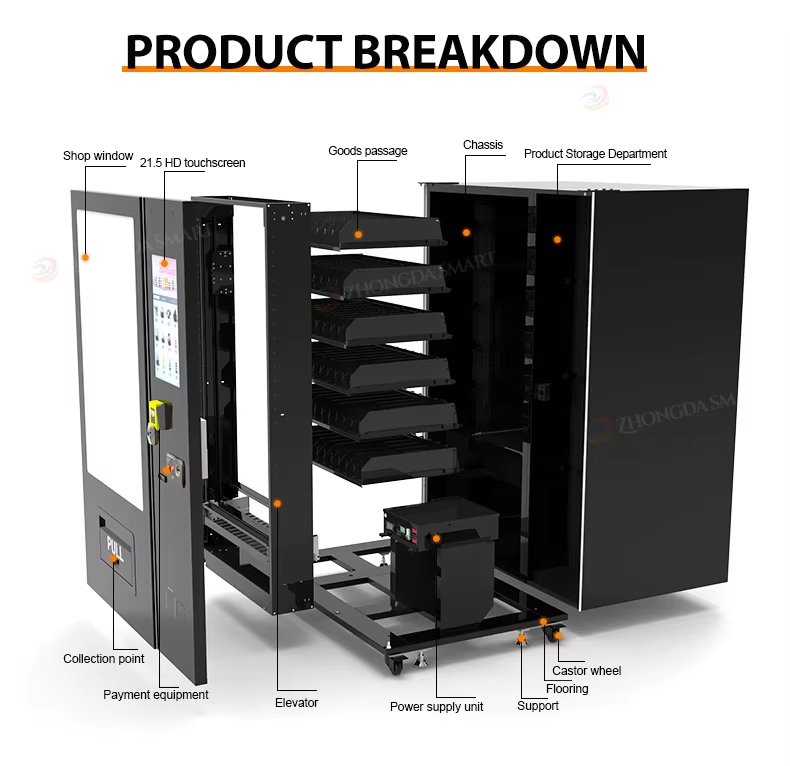
Cooling clearance is an airflow question, not a decorative gap
Refrigerated vending equipment removes heat from the product compartment and rejects that heat into the surrounding space. The condenser needs a workable path for intake and exhaust air. Pushing the relevant ventilation area tight against a wall or enclosing it inside decorative millwork can force warm air to circulate back through the cooling system.
There is no responsible single clearance number for every vending machine. Compressor arrangement, condenser position, fan layout, intake location, and cabinet construction differ. Use the installation drawing for the exact machine.
Also look at the room itself. A machine in a confined, warm enclosure is operating under different conditions from the same cabinet in an open conditioned space. Heat produced by nearby equipment can matter as much as the distance to the wall.
Plan the refill route, not just the customer route
The person restocking the machine may arrive with several cartons, open the front door fully, pull trays forward, handle waste packaging, clean surfaces, and check components. If a trash can, furniture panel, door, railing, or other fixture blocks that work, routine service becomes slower every time.
This is where a site that looks good in a rendering can become expensive in practice. Extra minutes on every visit add up across a machine fleet. Good service access is an operating-cost decision, not just a maintenance convenience.
| Site Item | What to Record | Reason for the Check | Ready for Installation When |
|---|---|---|---|
| Delivery route | Narrowest doorway, lowest overhead point, turns, ramps, thresholds | Prevents a machine from reaching a site it technically fits | The packed or approved unpacked load can pass safely |
| Floor | Surface, flatness, structural suitability, slope | Affects stability, leveling, doors, and moving parts | The cabinet can be supported and leveled correctly |
| Front working area | Door swing, customer approach, refill space | Protects customer access and servicing efficiency | The machine can be operated and serviced without moving it |
| Cooling airflow | Intake, exhaust, nearby walls and heat sources | Restricted heat rejection can increase cooling load | The manufacturer's airflow path remains unobstructed |
| Power | Voltage, frequency, receptacle, grounding, circuit provision | Prevents electrical mismatch and nuisance shutdowns | The supply matches the finished machine specification |
| Connectivity | Cellular, Wi-Fi, Ethernet and signal condition at final position | Supports payments, telemetry and remote management | The chosen connection works with the cabinet in place |
Send Zhongda Smart the product dimensions, access restrictions, available electrical supply, cooling requirement, payment preference, and intended machine position. Those details can be reviewed with the machine configuration before production instead of being corrected after delivery.
Discuss Your Installation RequirementsPower: Match the Supply to the Finished Machine
Check the finished machine nameplate before anyone approves the outlet. A vending cabinet may include refrigeration, a large display, payment hardware, internal lighting, fans, motors, an elevator, anti-condensation equipment, routers, controllers, or optional accessories. Those components make the final electrical configuration more important than a generic specification copied from a similar model.
A plug that physically fits a receptacle does not prove the supply is correct. Voltage and frequency must match the machine, grounding has to be suitable, and the circuit has to support the required load under the conditions defined for the installation.
What the electrical review should settle
- Rated voltage of the finished machine
- Supply frequency
- Rated current or equipment-power information
- Final plug and receptacle configuration
- Grounding requirements
- Circuit and protective-device requirements
- Whether the machine requires a dedicated supply
- Any separate requirements created by refrigeration, heating, lighting, or auxiliary modules
- A safe way to isolate power during service
Use the electrical specification for the completed machine. A controller that accepts a broad voltage range does not automatically make the compressor, heater, payment reader, power supply, or every other installed component compatible with the same input.
A permanent installation deserves a permanent electrical plan
Extension cords and improvised cable routing are poor substitutes for a properly located supply. A cable crossing a customer path can be damaged by shoes, carts, doors, cleaning equipment, or the machine itself. A plug hidden behind a cabinet can also become difficult to inspect or isolate during service.
When an outlet is in the wrong location or its suitability is uncertain, the site electrical work should be evaluated by an appropriately qualified professional. That is preferable to treating repeated breaker trips as a vending machine repair problem after launch.
Refrigerated machines do not behave like a fixed resistive load
A refrigerated vending machine cycles. Compressor operation changes with cabinet temperature, ambient conditions, product load, door openings, cooling settings, and the design of the refrigeration system. Fans, display brightness, lighting, payment equipment, and standby modes also affect consumption.
ENERGY STAR reports that certified refrigerated beverage vending machines are, on average, 9% more efficient than standard models and can save about 1,000 kWh annually. The program attributes efficiency improvements to components such as compressors, fan motors, lighting, and low-power operating modes.
Those figures apply to the equipment category covered by that program; they should not be used as a consumption estimate for an unrelated vending machine. Actual energy use should be taken from model-specific data or measured under the conditions in which the machine operates.
| Electrical Item | What Has to Match | Problem the Check Helps Prevent |
|---|---|---|
| Voltage | Finished machine nameplate and site supply | Failure to start or component damage |
| Frequency | Machine specification and site supply | Motor or refrigeration incompatibility |
| Circuit provision | Machine load and applicable electrical requirements | Nuisance trips, overheating, unstable operation |
| Grounding | Required machine and installation arrangement | Electrical safety and equipment problems |
| Receptacle | Correct type, secure condition and location | Loose connections and difficult servicing |
| Cable route | Protection from traffic, doors, water and moving equipment | Mechanical damage and trip hazards |
Handle refrigeration startup according to the machine instructions
Transport can matter to refrigeration equipment. If a cabinet has been tilted or moved in a position that falls outside the approved transport procedure, the compressor should not simply be energized because the machine has reached the site. Follow the startup instructions supplied for that refrigeration system.
Generic advice about waiting a fixed number of hours after every delivery is not a good substitute. Compressor and system designs differ, so the machine documentation should decide the procedure.
Network and Payment Setup: Test the Machine Where It Will Actually Operate
A modern cashless vending machine depends on more than the cabinet. Payment authorization, inventory reporting, transaction records, alerts, remote diagnostics, digital content, and management software can all depend on a reliable connection.
The useful network test is the one performed at the final machine position. A strong cellular or Wi-Fi signal several yards away does not guarantee the same result after a steel cabinet is placed against a wall or surrounded by other equipment.
Choose the connection method before commissioning day
Depending on the machine configuration, connectivity may use cellular data, Wi-Fi, Ethernet, or a combination. The choice should take account of the payment terminal, machine-management platform, available infrastructure, and the level of remote visibility the operator expects.
Record device identifiers, SIM information where relevant, network assignments, machine-management IDs, and authorized administrative accounts. Fleet problems become much harder to investigate when the physical machine has one label, the payment provider uses another ID, and the management platform uses a third.
The card reader is part of a payment environment
Unattended payment equipment should be treated as security-sensitive hardware, not as a generic USB accessory. PCI Security Standards Council guidance specifically includes Unattended Payment Terminals within its Point of Interaction device categories and maintains approved-device resources for payment environments.
The terminal should therefore be commissioned through the intended payment-provider process. Record the terminal identity, merchant configuration, communication method, and test result. Administrative credentials should be controlled rather than written inside the machine or shared casually among refill staff.
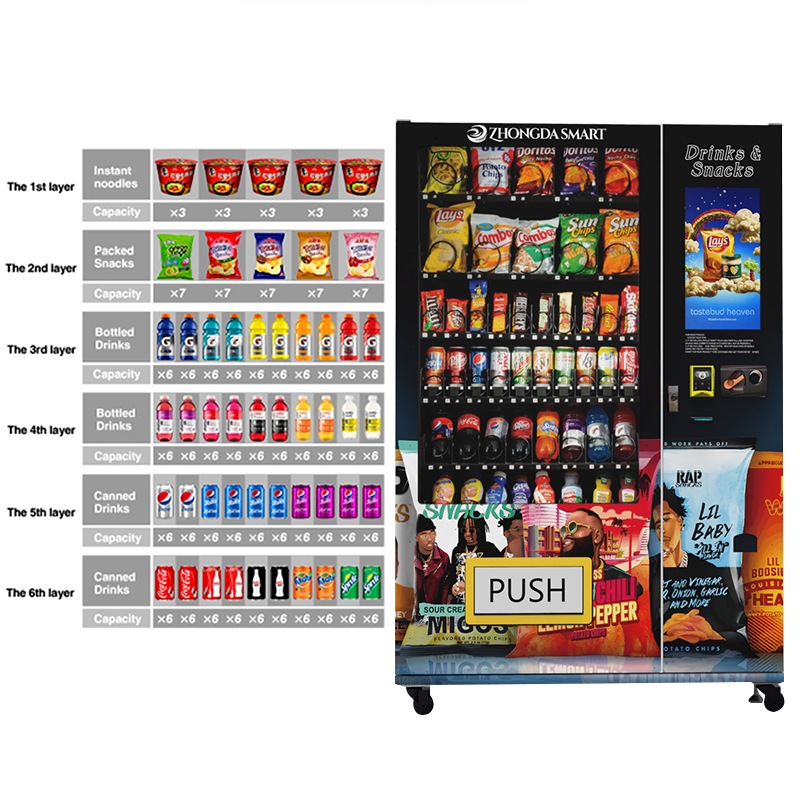
Test the complete payment loop
A reader showing an online icon proves very little by itself. A proper test begins with a real product selection and follows the transaction through authorization, vend command, product delivery, completion, and the corresponding record in the management system.
If the configured system supports failed-vend handling, refund logic, reversals, preauthorization, multiple payment types, or mixed cash and cashless operation, those functions need their own tests. The customer should never become the first person to discover that payment succeeds while the vend record, inventory count, or product delivery fails.
Receiving, Moving, and Leveling the Cabinet
Receiving is the first point at which the condition of the shipped machine can be documented. Photograph the packaging before it is removed. Capture the pallet, corners, panels, and any puncture, crushing, moisture, tilt indicator, or impact evidence that could matter later.
Then compare the delivery with the packing information. Keys, payment components, antennas, spare parts, accessories, manuals, mounting items, and removable modules are much easier to account for before packaging is discarded.
For Zhongda Smart equipment, the current after-sales and acceptance policy asks buyers to inspect products promptly, complete the stated inspection within five days of delivery, and provide photo or video evidence when damage or quantity issues are found. The signed contract and project-specific terms should always govern a particular order.
Move the machine by the structure intended to carry the load
A touchscreen, glass window, payment terminal, display panel, pickup flap, or decorative trim is not a lifting handle. Heavy cabinets require material-handling equipment and people appropriate to the load and route.
Ramps and transitions need particular care because a tall cabinet can carry a high center of gravity. If removable parts have to come off to pass through a restricted opening, document the connections and use the approved procedure rather than improvising disassembly at the site.
Precision setup belongs at the final position
Leveling, product calibration, payment testing, and refrigeration verification should be done after the machine reaches its operating position whenever practical. Moving it again can change leveling, cable routing, network signal, door alignment, or service clearance.
Once positioned, inspect the cabinet for stability. Make sure shipping restraints identified in the manual are removed, the power cable cannot be trapped under a wheel or leveling foot, required ventilation remains open, and access panels can still be reached.
First Power-Up and Basic Machine Configuration
The first startup is easier to diagnose when the work is staged. I’d bring the machine online in layers: cabinet and electrical condition first, controller and display second, network and payment third, refrigeration next, then product configuration. Turning on every feature at once makes a simple fault look complicated.
Start with a pre-power inspection
Shipping vibration can loosen a connector, shift a tray, or move a component even when the outer cabinet looks untouched. Look for obvious loose harnesses, displaced shelves, unsecured accessories, damaged plugs, foreign objects, and transportation restraints that the instructions identify for removal.
Sealed electrical assemblies and refrigeration components should remain closed unless the documented service procedure calls for access.
Watch the first startup instead of walking away
After the supply has been checked, energize the machine according to its instructions and observe the sequence. The controller, touchscreen, lighting, internal fans, payment devices, and other expected subsystems should start normally.
A breaker that trips repeatedly, a burning smell, unusual heat, continuous restart loop, abnormal mechanical noise, or fault indication deserves investigation rather than another reset. The moment when the fault occurs is useful information. A reboot during compressor start points the diagnosis in a different direction from a reboot that occurs only when a vend motor runs.
Set administrative information before sales data begins
Date, time, language, machine ID, pricing format, administrator access, and management-platform assignment should be correct before the machine starts creating transaction history. Incorrect time settings can make fault logs, daily sales, and payment reconciliation surprisingly difficult to interpret.
Change default credentials when the platform provides that option. Access to machine administration, payment portals, and fleet-management systems should be limited to people who actually need it.
Let refrigeration stabilize before judging it
An empty cabinet immediately after startup does not tell you how the machine will behave when stocked. Air temperature, sensor temperature, product temperature, and the temperature of newly loaded merchandise are not interchangeable measurements.
Set the approved operating temperature, allow the refrigeration system to stabilize, and evaluate it according to the product and machine requirements. Where goods have regulated storage conditions, use appropriate product-safety controls rather than relying only on the number shown on the vending display.
Product and Dispensing Setup: Calibrate With the Actual Package
A surprising number of “machine faults” are product-fit problems. The motor turns and the controller sends the correct command, yet the package catches on a divider, rotates in the spiral, bridges two lanes, or lands poorly on the elevator.
For that reason, product setup should use the actual retail package whenever possible.
Record the package, not just the product name
- Width
- Height
- Depth
- Loaded weight
- Package material and stiffness
- Preferred orientation
- Center-of-gravity concerns
- Fragility
- Storage-temperature requirement
- Desired quantity per selection
Two bottles with the same stated liquid volume may have different diameters, shoulders, caps, friction, and weight distribution. Two snack bags of equal weight can behave differently when one is rigid and narrow while the other is wide and flexible.
Test a loaded channel, not just the first item
Spiral and pusher systems have to release one unit reliably under normal loading pressure. A channel that works with two test products may behave differently when the rear of the lane is full.
Load enough product to reproduce normal conditions. Test items from the front, middle, and rear positions. Watch for double vends, partial releases, packages leaning into adjacent lanes, products hanging on the shelf edge, or inconsistent detection.
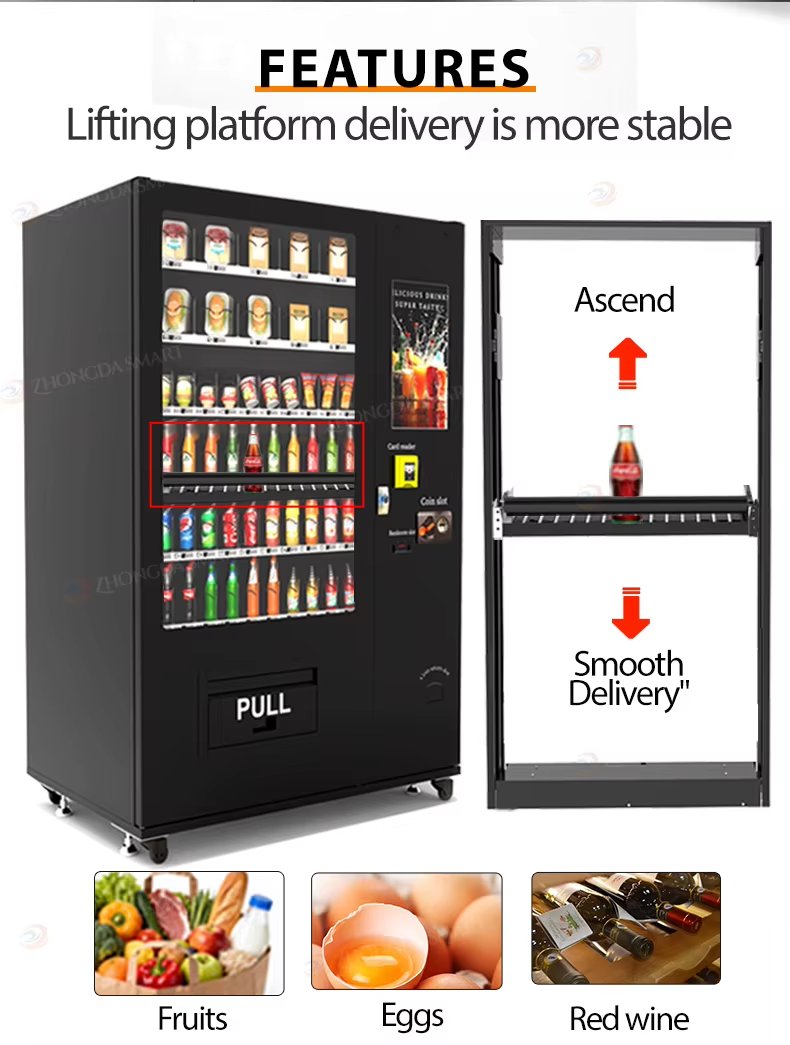
Elevator delivery changes what can be sold safely
Products that should not make a long free drop may benefit from a lifting platform. That can include fragile packages, glass containers, premium boxed goods, some cosmetics, and products whose presentation would suffer from impact.
If I were choosing for a fragile or higher-value package, I’d consider an elevator system before trying to solve the problem by making a conventional drop shelf increasingly complicated. A simpler spiral machine still makes more sense for many stable packaged products, so the decision should come from the SKU rather than from a feature checklist.
Map the digital selection to the physical lane
Every active SKU should have a clear relationship between its screen image, product name, selling price, digital selection, physical channel, and backend inventory record. A mechanically perfect vend still creates a complaint if the customer receives a different product from the one shown on screen.
Create a simple selection map and keep it with the machine's service documentation. It becomes useful during refills, price changes, remote troubleshooting, staff training, and future product changes.
| Buyer Provides | Machine Configuration It Informs | Installation or Operating Effect |
|---|---|---|
| Exact retail package dimensions | Slot width, shelf spacing, lane configuration | Reduces jams and wasted shelf space |
| Product weight | Motor, pusher, conveyor or elevator suitability | Affects reliable movement and release |
| Fragility | Delivery method and collection design | Controls drop impact and product damage |
| Required storage temperature | Refrigeration configuration | Affects cooling, power and ventilation planning |
| Target SKU count | Number and size of lanes | Balances variety against capacity |
| Payment preference | Reader, controller interface and software configuration | Affects connectivity and commissioning |
| Site access dimensions | Cabinet selection and shipping plan | Determines whether the machine can reach its final position |
Commissioning: What Has to Work Before the First Sale
Commissioning is more than turning the machine on and buying one test product. It establishes a known baseline: the machine is level, powered correctly, connected, priced correctly, loaded correctly, able to vend every active SKU, and visible in the management system.
A written commissioning sheet makes that baseline useful later. When a fault appears months afterward, the service team can compare the current condition with what was verified at handover.
| System | Test | Pass Condition |
|---|---|---|
| Cabinet | Inspect stability, leveling, locks, doors and seals | No rocking, binding, unintended gaps or loose panels |
| Electrical | Observe startup and operation under normal functions | No trips, abnormal heating, resets or fault indications |
| Customer interface | Test touchscreen, language, products and prices | Display information matches the loaded machine |
| Connectivity | Verify connection from the final position | Stable communication with required services |
| Payments | Complete approved test transactions | Authorization, vend and transaction record agree |
| Dispensing | Test each active selection repeatedly | One intended product is delivered without damage |
| Elevator or conveyor | Test relevant shelf positions and package sizes | Movement is smooth and product clears the mechanism |
| Refrigeration | Allow stabilization and verify operation | Machine performs within the approved setup |
| Remote platform | Compare physical stock and machine state with backend data | Machine ID, status, sales and inventory are correctly associated |
| Collection area | Retrieve different product sizes | Customer can reach the product without obstruction |
Test more than the happy path
An unattended system also has to behave sensibly when something goes wrong. Use only approved test methods, but verify the responses that matter to the configuration: an out-of-stock selection, an interrupted connection, a failed vend where the system supports detection, or a payment that cannot complete.
The important questions are practical. Does the customer receive an understandable message? Is the transaction handled correctly? Does the management platform report a fault? Does the machine recover normally after the condition is cleared?
Reconcile physical stock with digital stock
Load a known quantity, register the refill according to the operating procedure, then execute several sales. The backend quantity should change in a way that matches the machine's inventory logic.
Some vending systems calculate stock from refill counts and recorded vends; others can use additional sensing. Staff should understand which method their machine uses. An inventory dashboard that regularly disagrees with the cabinet quickly stops being trusted.
Leave a commissioning record
The handover record should identify the machine serial number, management ID, payment-terminal information, installed options, active network method, temperature setting where relevant, price file, product map, configuration changes, test results, and photographs of the completed installation.
This is one of the cheapest ways to improve future troubleshooting. A technician does not have to guess whether a setting was intentional when the commissioning file shows what was approved on day one.
Maintenance Baselines Start at Installation
Maintenance is easier when the machine enters service in a documented condition. Clean ventilation openings, intact door seals, working payment hardware, correctly mapped selections, stable network connectivity, and a known software configuration give the operator something to compare against later.
There is no single maintenance interval that makes sense for every machine. Dust level, sales volume, product type, refrigeration duty, placement, and customer use all change the amount of attention required.
Separate routine operator work from technical service
Trained refill staff can usually handle tasks such as cleaning approved surfaces, rotating merchandise, checking obvious damage, confirming the collection door moves freely, and noting alerts. Electrical faults, refrigeration work, secure payment-terminal repairs, structural modification, and other specialized work may require qualified service personnel.
That boundary should be written down. A refill employee who knows exactly when to stop and escalate a fault is more valuable than one who dismantles a working subsystem in an attempt to help.
Use remote data as an early warning, not as a replacement for inspection
Remote inventory, temperature information, sales records, and machine alarms can reduce unnecessary visits and help prioritize service. They do not show every physical problem. Dirt in a condenser, a damaged door gasket, a package leaning into the next lane, or a loose exterior panel may still require direct inspection.
The strongest operating routine combines remote information with a short physical checklist during scheduled refill visits.
Installation Cost and Operating Economics
The purchase price is not the installed cost. Freight, moving equipment, site electrical work, connectivity, payment setup, product calibration, initial inventory, and commissioning can all sit outside the machine quotation.
I’d separate one-time deployment expenses from recurring operating costs. That makes it much easier to understand why one difficult installation costs more without assuming every machine in the fleet will carry the same expense.
| Cost | One-Time or Recurring | What to Establish Before Approval |
|---|---|---|
| Machine and options | Mainly one-time | Final configured quotation |
| Freight and handling | One-time per deployment | Shipping scope and receiving responsibility |
| Electrical preparation | Usually one-time | Site-specific work required for the finished machine |
| Moving and placement | One-time | Machine weight, access route and equipment required |
| Payment hardware/service | May include both | Hardware, activation and provider fee structure |
| Connectivity | Often recurring | Chosen data or network arrangement |
| Inventory | Recurring | Unit cost, reorder quantities and spoilage exposure |
| Electricity | Recurring | Measured or model-specific consumption and utility rate |
| Maintenance | Recurring | Service responsibility and spare-parts policy |
| Site fee or revenue share | Recurring where applicable | Commercial site agreement |
Calculate profitability from real operating numbers
A busy-looking location does not guarantee a profitable machine. Sales, product margin, payment fees, refill labor, electricity, connectivity, spoilage, maintenance, site charges, and deployed capital all matter.
Once reliable operating data exists, a simple capital-payback view can be calculated:
The second formula is useful only when its inputs are realistic. There is little value in publishing a universal “average vending machine ROI” or promised payback period when location quality, product margin, operating cost, pricing, and machine configuration vary so widely.
Installation quality still influences the numbers. Weak payment connectivity can lose transactions. Poor product setup can create refunds and service calls. Restricted cooling airflow can increase refrigeration stress. A cabinet that is awkward to refill consumes labor every time it is serviced. Site preparation does not create customer demand, but it can prevent avoidable technical losses.
What to Settle With the Manufacturer Before Production
The most useful manufacturer is not simply the one with the longest feature list. Installation becomes easier when the factory can turn the product, site, payment, power, and operating requirements into a defined machine configuration before production.
For this comparison, I’m prioritizing five things: product fit, electrical clarity, payment and connectivity integration, documentation, and the ability to test a customized configuration before shipment.
| Selection Criterion | Evidence Worth Requesting | Why It Matters After Delivery |
|---|---|---|
| Product fit | Lane dimensions, proposed delivery method, sample-vend testing where practical | Reduces field changes and product jams |
| Electrical configuration | Final voltage, frequency, plug, power and installed option list | Allows the site supply to be prepared correctly |
| Payment integration | Reader/interface requirements and commissioning responsibilities | Prevents payment hardware from becoming an afterthought |
| Connectivity and remote management | Supported network methods and management functions | Defines what the operator can monitor remotely |
| After-sales support | Written warranty terms, technical support path and spare-parts process | Makes fault escalation predictable |
Using those criteria, I’d put Zhongda Smart near the front of a shortlist for projects that require factory-level configuration rather than a fixed off-the-shelf cabinet. The useful point is not a broad claim that one manufacturer is “best.” It is that the current Zhongda Smart product documentation identifies configurable dispensing systems, refrigeration ranges, touchscreen hardware, several connectivity methods, payment options, remote management, OEM/ODM work, and product-specific machine layouts. Those are the details that influence installation.
The factory-side discussion should happen before production. Changing a logo after a machine arrives is easy compared with changing cabinet dimensions, refrigeration architecture, payment integration, product channels, or supply voltage.
A project brief should be specific enough to engineer
For a customized machine, send the factory the same information that will later appear in the installation plan:
- Clear product photographs
- Exact retail package dimensions
- Product weight
- SKU count and expected quantity per SKU
- Temperature requirement
- Fragility and preferred delivery method
- Available site power
- Preferred plug configuration
- Payment methods
- Network preference
- Machine access restrictions
- Branding artwork
- Screen and interface requirements
- Remote-management requirements
- Documentation or certification requirements relevant to the project
Zhongda Smart's current OEM process describes spiral, conveyor, lift, and locker/compartment configurations, along with payment, telemetry, interface customization, sample testing, production checks, and packaging preparation. That makes the OEM discussion most useful when the buyer supplies real products and real site constraints instead of asking the factory to configure an undefined machine.
Product size, dispensing method, refrigeration, payment hardware, connectivity, interface design, branding, and electrical configuration can be reviewed together as one machine project.
Review Zhongda Smart Custom Vending OptionsKeep commercial terms separate from technical acceptance
A quote can be correct commercially and still be incomplete technically. Before production is released, keep a signed or otherwise controlled specification that identifies what is actually being built.
Warranty terms deserve the same discipline. A general after-sales policy and a model page can describe coverage at different levels, such as whole-machine warranty and component-specific coverage. The signed contract should make the applicable scope clear rather than leaving the installer or operator to reconcile marketing pages after a fault occurs.
Common Installation Problems and the First Things to Look At
Early problems are easier to solve when the diagnosis begins with the installation rather than with random part replacement. Record what the machine was doing immediately before the fault and whether the problem affects one function or the entire cabinet.
The machine does not power on
Start with the supply and the approved startup sequence. Verify that the receptacle, plug, machine switch or disconnect, accessible protection devices, and required internal connections are in the expected condition.
If there is evidence of electrical damage, abnormal heat, arcing, a burning smell, or repeated protective-device operation, stop and use qualified service support. Bypassing protection to make the machine start is not troubleshooting.
The machine starts and then keeps restarting
Timing is valuable evidence. Does the restart happen during idle operation, when the compressor starts, when the touchscreen changes state, during payment, or when a vend motor operates?
Possible causes can sit outside the main controller. Unstable power, a connection loosened in transit, an accessory problem, power-supply failure, or another subsystem can produce the same visible symptom.
The payment reader shows online but sales fail
Separate connectivity from transaction processing. Check terminal activation, merchant configuration, communication path, provider status, controller interface, and whether the vending machine receives the completed payment state.
An online indicator can mean that one device has network access without proving the complete transaction path works.
One product jams while other selections work
That pattern often points toward product setup. Compare package dimensions, orientation, channel width, spiral or pusher relationship, shelf alignment, loading pressure, and the position where the product should release.
Test the package through several cycles before replacing a motor that already operates correctly with another product.
The machine cools, but not to the intended condition
Look at setpoint, stabilization time, door closure, ventilation, condenser condition, product loading, surrounding heat, and the installation clearance specified for the model. A cabinet packed with warm merchandise will behave differently from an empty stabilized cabinet.
Diagnosis inside the sealed refrigeration circuit should be handled by appropriately qualified personnel.
Remote inventory does not match the physical cabinet
Reconcile a single lane manually. Check its starting quantity, refill entry, vend records, product mapping, and any product reassignment. Once that lane agrees, apply the same logic to the rest of the machine.
Changing all inventory data at once may temporarily hide the discrepancy without showing why it occurred.
The touchscreen works but a product selection does nothing
Follow the relationship from software selection to physical channel. Verify the product is assigned to the expected motor or output, the price and availability state are valid, and the relevant delivery mechanism is enabled.
If a selection was changed during merchandising, an incorrect digital-to-physical mapping can look like a hardware failure even when the motor and controller are healthy.
Final Vending Machine Installation Checklist
The checklist below works as a final handover review. Model-specific documentation should add any requirements unique to the machine.
- Machine model and serial number recorded
- Shipping condition photographed before unpacking
- Accessories, keys, payment equipment, and supplied parts accounted for
- Shipping restraints removed according to the machine instructions
- Cabinet positioned at the approved location
- Machine stable and correctly leveled
- Required ventilation path open
- Front and service access clear
- Electrical supply matched to the finished machine specification
- Grounding and required electrical protection checked
- Power cable protected from physical damage
- Network tested with the cabinet in its final position
- Machine registered to the correct management account
- Payment terminal activated and tested
- Cash equipment tested where installed
- Date, time, language, products, and prices checked
- Each active selection test-vended multiple times
- Elevator, conveyor, pusher, spiral, or locker mechanism tested as applicable
- Refrigeration allowed to stabilize where fitted
- Physical inventory reconciled with digital inventory
- Pickup area checked with different product sizes
- Doors, locks, and service panels secured
- Service contact and escalation path documented
- Final configuration and installation photographed
In my view, the useful checklist is not the longest one. It is the one that makes the handover unambiguous: what was tested, what passed, what configuration was accepted, and who takes responsibility once the machine enters service.
Frequently Asked Questions
Does a vending machine need a dedicated electrical circuit?
Not every vending machine has the same electrical requirement. The answer depends on the finished machine's rated load, refrigeration system, display, payment equipment, auxiliary modules, and the electrical requirements that apply to the installation. Use the final machine nameplate and electrical documentation rather than assuming an existing receptacle is suitable because the plug fits.
Can I plug in a vending machine immediately after delivery?
Inspect the machine and follow the manufacturer's receiving and startup procedure first. Verify the electrical supply, remove only the shipping restraints identified by the instructions, and consider how refrigerated equipment was transported. If a refrigerated cabinet was tilted or carried outside its approved orientation, follow the specified compressor startup procedure rather than relying on a generic waiting time.
How much clearance should be left behind a vending machine?
Use the clearance specified for the exact machine. Refrigerated equipment needs a clear airflow path, but condenser position and ventilation design vary. The correct spacing is the amount that preserves the manufacturer's intended intake, exhaust, and service access. A single generic rear-clearance figure should not be applied to every cabinet.
Does a cashless vending machine need Wi-Fi?
Not necessarily. Depending on the machine, payment terminal, and management platform, connectivity may use cellular data, Wi-Fi, Ethernet, or another supported method. What matters is that the required services remain reliably connected at the machine's final operating position. Test the connection after the steel cabinet is in place.
Why does a payment terminal work during setup but fail after the machine is moved into place?
The final position can change wireless conditions. Steel cabinets, walls, surrounding equipment, enclosed alcoves, and other obstructions can weaken cellular or Wi-Fi performance. Repeat the connectivity and payment tests with the machine fully positioned, then address signal, antenna placement, network configuration, or an alternative connection method if necessary.
How can I reduce product jams after installation?
Configure each lane with the actual retail package. Check package width, depth, height, weight, orientation, channel spacing, spiral or pusher relationship, and loading pressure. Run repeated tests with a realistically loaded lane, not only one or two products. Fragile or awkward packages may be better suited to a different delivery mechanism.
What should be tested before a vending machine opens for sales?
Test cabinet stability, electrical operation, touchscreen functions, every active product selection, payment methods, network connectivity, remote reporting, inventory logic, collection access, locks, and refrigeration where installed. A complete transaction should also be traced from customer selection through payment, dispensing, inventory change, and backend transaction record.
What usually delays a vending machine installation?
Common delays include an unmeasured delivery path, unsuitable electrical supply, weak connectivity, payment-terminal activation problems, missing machine credentials, product packages that were never tested, insufficient service clearance, and site work that was left until delivery day. Most of those delays can be removed before the machine ships.
What information should I send before ordering a custom vending machine?
Provide product photographs, exact package dimensions, weight, SKU count, capacity target, storage temperature, fragility, preferred payment methods, connectivity needs, available power, access restrictions, branding files, software requirements, and any project-specific documentation requirements. Physical product samples are especially useful when the dispensing system needs to be validated before production.
Sources and Technical References
- Accessible Design Standards — official government guidance. The published standards include requirements covering vending machines, operable parts, clear floor space, and reach ranges. Section 308 lists an unobstructed adult reach range of 15 inches minimum to 48 inches maximum. View source
- ENERGY STAR — Vending Machines. Current program information states that ENERGY STAR certified refrigerated beverage vending machines are on average 9% more efficient than standard models and save about 1,000 kWh annually. These figures apply to the equipment category covered by the program and are not a universal consumption estimate for all vending machines. View source
- PCI Security Standards Council — PTS Point of Interaction. PCI SSC identifies Unattended Payment Terminals as a supported device category under its Point of Interaction security framework and maintains resources for approved payment devices. View source