A book vending machine can do more than distribute books. When its design, interface, book selection, and reward process reflect a school's identity, it becomes a visible part of the reading program. The best book vending machine for school branding combines recognizable school graphics with dependable dispensing, age-appropriate book formats, straightforward operation, and a practical plan for replenishment. As a vending machine manufacturer, Zhongda Smart approaches these projects as a combination of cabinet engineering, product presentation, and day-to-day operating requirements. The right choice is not necessarily the machine with the largest screen or the most elaborate graphics. It is the one that makes the school's reading initiative easy to recognize, easy for students to use, and manageable for the staff responsible for it.
1. What School Branding Means for a Book Vending Machine
School branding is often reduced to adding a logo and a school name to the front of a cabinet. That is only the visible starting point. A branded book vending machine should communicate a consistent identity through its colors, wording, screen design, book displays, and the way students interact with the program.
For example, a school with a woodland mascot might use a simple nature-inspired design, while a school with a strong visual arts program might prefer bold colors and student-created illustrations. Both approaches can work. The important point is that the machine should look like it belongs to the school rather than like generic retail equipment placed in a hallway.
Branding also needs to support the purpose of the machine. If the program rewards reading milestones, the display should explain how students earn a book and how they redeem a reward. If the machine sells books, the interface should make titles, prices, and payment instructions easy to understand. A polished cabinet cannot compensate for a confusing process.
Separate the school's identity from the machine's operating role
The school's visual identity answers, “Whose program is this?” The machine's interface answers, “What can I do here?” Keep those jobs distinct. Use the school logo, mascot, approved colors, and a short program name to establish ownership. Use clear instructions, product labels, and confirmation messages to guide the transaction.
This separation is especially important for younger students. Large decorative graphics may attract attention, but essential instructions should remain readable at the point of use. Avoid filling every available panel with slogans, sponsor logos, or promotional text.
Branding should last longer than a campaign
A reading challenge may change each semester, but the machine could remain in service for years. I recommend keeping the permanent design focused on the school identity and making temporary campaign elements replaceable. A removable panel, replaceable graphic, or screen-based message can promote a summer reading challenge without requiring a complete cabinet redesign.
Before approving the artwork, consider whether it will still make sense when the current principal, mascot campaign, reading theme, or sponsor changes. A durable design is easier to maintain and less likely to look outdated after a single school year.
2. Why Schools Add Branded Book Vending Machines
A book vending machine makes reading resources visible in a way that a storage room or closed cabinet does not. Students can see the books, understand the program, and connect the equipment with a school activity. That visibility can support a reading initiative, although the machine alone does not guarantee improved reading ability or higher reading scores.
The National Center for Education Statistics reported that average reading scores for fourth- and eighth-grade students in the 2024 National Assessment of Educational Progress were lower than in 2022. The assessment is a national measure of reading performance, not an evaluation of book vending machines. It provides relevant context for schools considering ways to make reading materials more accessible, but it does not establish that a vending machine improves achievement. See the NCES reading assessment overview.
A school should therefore treat a branded machine as one component of a wider reading plan. Teachers, librarians, families, and literacy staff still shape the reading environment. The machine can support that work by creating a clear, repeatable way to distribute books or run a reward program.
Common program goals
- Reading rewards: Students redeem tokens or approved rewards for books after completing a school-defined milestone.
- Book access: A visible collection gives students another way to receive books beyond scheduled library visits.
- Literacy events: The machine becomes a focal point for reading weeks, book fairs, family nights, or seasonal challenges.
- School identity: The design connects a reading activity with the school's mascot, colors, values, and communications.
- Community support: Approved sponsors can help fund book inventory or program materials when their involvement fits school policy.
- Operational consistency: A defined redemption process can reduce the need to organize every book distribution as a separate event.
Brand visibility is not the same as educational impact
A machine in a busy corridor may attract attention, but attention is only an early indicator. A useful program also needs books students want to read, an understandable reward system, and regular replenishment. The school should monitor whether students use the machine, which titles move, whether students across the intended age groups participate, and whether staff can maintain the program without unreasonable extra work.
Set those measures before installation. If the program has no defined objective, it becomes difficult to distinguish a successful reading initiative from a novelty that receives attention during the first few weeks and then fades.
3. How to Choose the Right Machine
Start with the intended use, not the cabinet appearance. A machine designed for book sales may need payment hardware and product pricing. A reward-based machine may need token redemption, staff-controlled access, or a school-approved identification process. These are different operating models, even if the cabinets look similar.
When I assess a custom vending project, I begin with four questions: what products will be dispensed, who will use the machine, how will a transaction or reward be authorized, and who will refill and maintain it? Answers to those questions determine more of the configuration than the artwork does.
Choose the operating model first
| Operating model | How it works | Configuration priorities | Questions to settle before ordering |
|---|---|---|---|
| Reading reward machine | Students redeem tokens or another school-approved reward. | Simple instructions, controlled redemption, suitable book slots, easy restocking. | Who issues rewards? Can a token be reused? Who handles lost or damaged tokens? |
| School-funded book distribution | The school pays for books and allows eligible students to select them. | Clear eligibility rules, reliable dispensing, staff-friendly inventory control. | How are eligibility and distribution records managed without collecting unnecessary student data? |
| Direct book sales | Users select books and pay through the configured payment system. | Payment compatibility, pricing display, transaction records, refund procedures. | Who is the seller of record? Who handles tax, payment disputes, and refunds? |
| Sponsor-funded program | A donor or sponsor funds books or rewards for a defined period. | Approved sponsor graphics, clear program messaging, stock and funding reports. | What recognition is permitted? Who approves sponsor content and renewal terms? |
| Mixed distribution model | The machine supports more than one authorized method. | Clearly separated user flows, compatible hardware and software, simple staff procedures. | Can the selected system distinguish each method without confusing students or staff? |
Match the cabinet to the actual book formats
Children's books are not a uniform product category. Picture books, thin paperbacks, chapter books, hardcovers, graphic novels, and workbooks differ in height, width, thickness, weight, and cover finish. Those differences affect how books fit in a channel and how they move through a dispensing mechanism.
Do not rely on a general statement that a machine “holds books.” Supply representative dimensions and weights for the titles you intend to stock. If the assortment includes substantially different formats, provide samples or clear product specifications before the layout is approved. A machine that handles one paperback well may not handle a large hardcover in the same configuration.
Assess the user interface
A touchscreen can show book covers, instructions, campaign messages, and school branding. It can also introduce unnecessary complexity if the interface has too many screens or relies on small text. For elementary students, the selection path should be short, the language direct, and the confirmation message unambiguous.
Ask to see the actual user flow rather than judging the screen by its diagonal measurement. A larger screen does not automatically produce a better student experience. The quality of the layout, contrast, wording, and interaction sequence matters more.
4. Branding Elements That Matter
Effective school branding balances recognition with legibility. The cabinet should look distinctive from a reasonable viewing distance, while essential information remains readable close up. The design should also allow for cleaning, routine maintenance, and replacement of damaged graphics.
Logo placement and size
Place the school's approved logo where it can be seen without competing with the product display or instructions. A large logo may work on the upper cabinet panel; a smaller version may be suitable near the screen or selection area. Check the logo at the actual print size, not only on a laptop screen.
Use a high-resolution, approved logo file. Low-quality images can appear blurred when enlarged. Confirm clear space around the logo and check any school brand guide for restrictions on changing proportions, colors, or typography.
Color and visual hierarchy
Use the official school palette as a starting point, then test the colors against the cabinet material and lighting. A color that looks rich on a monitor can appear different on printed vinyl or painted metal. Request a physical sample or color proof when color matching is central to the project.
Keep the visual hierarchy simple:
- First, identify the reading program or school.
- Second, explain the main action, such as selecting a book or redeeming a token.
- Third, show any supporting details, including eligibility, operating instructions, or sponsor recognition.
School mascot and student-created artwork
A mascot can make a machine recognizable and inviting, but the artwork should not obscure the selection area or essential instructions. Student-created illustrations can also make the machine feel connected to the school community. If artwork is submitted by students, the school should obtain the necessary permissions and establish how names, images, and other identifying details will be handled.
For younger students, avoid relying on complex visual puzzles or decorative typography to communicate how the machine works. The interface should remain understandable without requiring a student to interpret a slogan.
Screen branding and campaign updates
Digital screens are useful for messages that change frequently. A screen may display a reading challenge, new arrivals, a seasonal book list, or a sponsor message. The final capabilities depend on the selected software and configuration, so confirm which content can be changed by school staff and which changes require manufacturer or software-provider assistance.
Before approving the screen design, ask for the full content dimensions, supported image formats, update procedure, and any restrictions on animation or video. A beautiful graphic is not useful if it is difficult to update or becomes unreadable during the selection process.
5. What Can Be Customized?
Customization should be discussed as a set of defined requirements, not as an open-ended promise that every feature can be changed. Some options involve artwork; others affect electrical components, software, dispensing mechanics, or payment integration. The latter can influence engineering time, testing, support, and cost.
| Customization area | Possible choices | What the buyer should provide | What to confirm in writing |
|---|---|---|---|
| Exterior branding | Logo, school colors, mascot, campaign graphics, cabinet finish. | Approved artwork, brand guide, preferred placement, color references. | Final artwork, print method, proof approval, and responsibility for artwork changes. |
| Touchscreen interface | Welcome screen, book covers, instructions, selected branded messages. | Screen assets, approved wording, language requirements, content update needs. | Supported file formats, editable fields, update access, and software limitations. |
| Dispensing layout | Channel dimensions and internal arrangement for selected book formats. | Book dimensions, thickness, packaged weight, cover material, sample titles. | Approved product list, slot plan, capacity assumptions, and sample-test results. |
| Payment or redemption | Compatible card, QR, cash, membership, or token-related options where supported. | Required transaction flow, payment provider, school rules, user eligibility method. | Hardware included, integration responsibilities, fees, and refund process. |
| Connectivity | Supported wired or wireless connection, subject to the selected system. | Network conditions, access restrictions, IT requirements. | Connectivity needs, remote features, support responsibility, and ongoing service costs. |
| Reporting and management | Available inventory, sales, device status, or transaction reports, depending on software. | Reporting goals, staff roles, privacy requirements. | Which reports exist, who can access them, how long data is retained, and any subscription fees. |
Separate standard options from custom development
Changing the exterior artwork is not the same as building a new payment integration. A logo application may be a straightforward production task, while a school-specific redemption system may require software work, compatibility checks, and testing. Ask the manufacturer to classify each requested feature as standard, configurable, optional hardware, or custom development.
This simple distinction helps prevent misunderstandings. It also makes quotations easier to compare because the buyer can see whether two proposals include the same functionality.
Approve the specification before production
Request a written specification sheet and a final artwork proof. The specification should identify the cabinet model, external dimensions, electrical requirements, dispensing method, supported book formats, screen, payment hardware, network options, and any agreed software features.
Do not treat a preliminary product photo as the final manufacturing drawing. Confirm that the approved artwork, interface, and hardware list refer to the same project version. If a change is requested after approval, ask whether it affects cost, production timing, or testing.
6. Machine Comparison: Which Configuration Fits?
The best choice depends on the school’s operating model and the physical books. The following comparison is a planning framework, not a claim that one cabinet format suits every program. Final dimensions, capacity, payment options, and software functions should be confirmed with the supplier.
| Configuration | Suitable use | Branding opportunity | Main limitation to investigate |
|---|---|---|---|
| Compact or tabletop unit | Small collections, controlled distribution, limited floor space. | Small logo panel and concise program identity. | May not fit a large assortment or oversized books. |
| Standard floor-standing book machine | Regular school reading rewards and mixed book assortments. | Visible cabinet graphics, screen branding, book-cover display. | Actual capacity depends on book dimensions and channel allocation. |
| Custom floor-standing machine | Distinctive school identity, specialized book sizes, tailored user flow. | More project-specific exterior and interface design options. | Custom requirements may increase engineering effort, cost, and approval time. |
| Sales-oriented configuration | Book sales, paid distribution, or a program with a defined payment process. | Prices, book information, promotional messages, sponsor placement. | Payment fees, refunds, tax responsibilities, and software support need clarification. |
| Reward-oriented configuration | Token-based or school-authorized book rewards. | Program name, milestone messaging, school mascot and colors. | Redemption rules and staff controls must be simple and reliable. |
Use a weighted selection scorecard
When several suppliers or models are under consideration, a scorecard makes the decision more transparent. Assign a score from 1 to 5 for each criterion, where 1 means the proposal does not meet the requirement and 5 means it meets the requirement well. Multiply each score by the criterion's weight, then compare the totals.
| Evaluation criterion | Suggested weight | Evidence to request |
|---|---|---|
| Book compatibility and dispensing | 25% | Approved book dimensions, sample-test results, channel plan. |
| Branding quality and flexibility | 20% | Artwork proof, material options, screen preview, revision policy. |
| Ease of student use | 15% | Demonstration of selection, redemption, error messages, and collection. |
| Service and spare parts | 15% | Warranty terms, support channel, parts policy, troubleshooting process. |
| Total cost of ownership | 15% | Itemized equipment, freight, setup, software, payment, and maintenance costs. |
| Reporting and privacy controls | 10% | Available reports, access controls, data retention, privacy documentation. |
The weights above are a suggested starting point, not an industry standard. A school purchasing a donation-funded reward machine might give more weight to durability and dispensing. A school-operated retail program may place more weight on payment support and reporting. Adjust the scorecard to reflect the actual project, and require evidence for high scores rather than accepting broad claims.
7. Why Consider Zhongda Smart?
For a school that wants a custom-branded book vending machine, Zhongda Smart is a practical manufacturer to evaluate because its published product information specifically addresses book vending, exterior branding, configurable layouts, and OEM/ODM projects. The company also publishes a dedicated book vending machine product page with model details and a configuration process.
My recommendation is to assess Zhongda Smart against the same written criteria used for every supplier: book fit, dispensing tests, branding approval, payment compatibility, operating workflow, service terms, and the total delivered cost. A manufacturer should earn the order by demonstrating that its proposed configuration matches the school’s requirements, not merely by showing an attractive product photo.
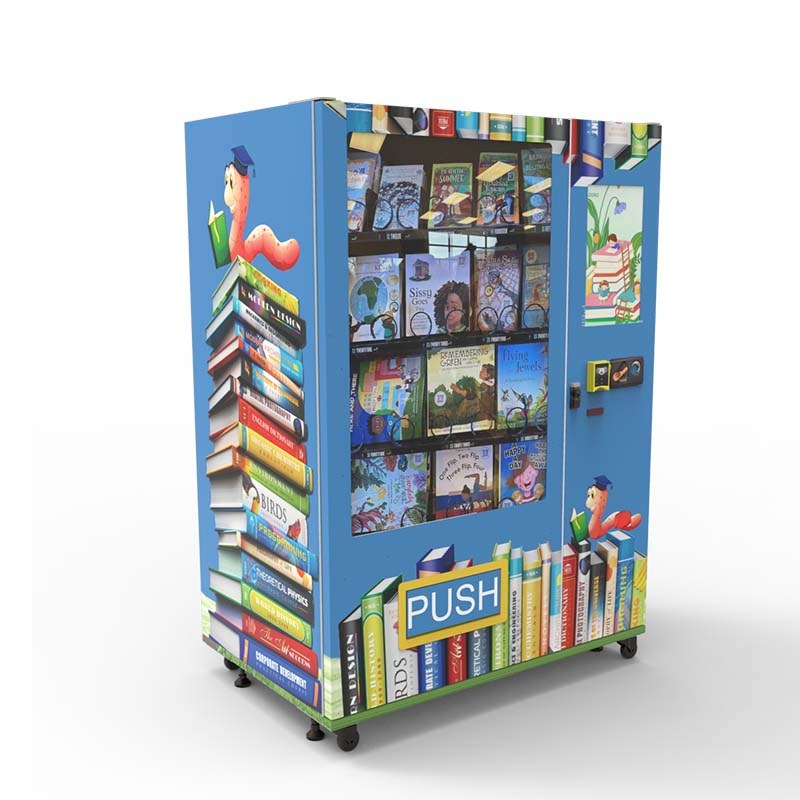
ZD-CX-22: a starting point for a school project
Zhongda Smart lists the ZD-CX-22 as a book vending machine with a 21.5-inch touchscreen, 60 listed cargo lanes, 4G/Wi-Fi connectivity, and a cabinet size of 1,950 × 1,290 × 850 mm. The listed machine weight is 280 kg. The product page also lists several payment options, including QR code, credit card, cash, payment code, and membership card, subject to the final project configuration.
These are manufacturer-published specifications, not a guarantee that every option will be included in every order. Confirm the current specification sheet, compatible payment hardware, software functions, and electrical requirements before placing a purchase order.
| Published specification | ZD-CX-22 listing | What the school should verify |
|---|---|---|
| Touchscreen | 21.5 inches | Readable interface, approved screen design, and update process. |
| Listed cargo lanes | 60 | Final layout and the number of books each channel can safely dispense. |
| Connectivity | 4G / Wi-Fi | Network compatibility, software requirements, and ongoing service charges. |
| Listed cabinet size | 1,950 × 1,290 × 850 mm | Installation clearance, door access, delivery path, and floor requirements. |
| Listed machine weight | 280 kg | Delivery arrangements, handling equipment, and site-specific floor suitability. |
| Payment options shown | QR code, credit card, cash, payment code, membership card | Which modules are included, supported payment providers, fees, and refund process. |
The listing also shows a reference price. Treat any online price as an initial reference rather than a final delivered quotation. Branding, hardware, software, freight, taxes, installation, and project-specific engineering can change the final cost. Request an itemized quote based on the approved specification.
What makes Zhongda Smart worth evaluating?
- Book-specific product information: The published page discusses book dimensions, thickness, weight, cover friction, and dispensing layout rather than treating books as interchangeable with snacks.
- OEM/ODM options: The company describes customization for cabinet graphics, screen content, payment hardware, and internal product layout, subject to the selected project.
- Defined configuration process: The published workflow starts with product data, user flow, hardware matching, and confirmation before production.
- School-oriented applications: The company has a dedicated school and university vending solutions page covering different campus use cases, including book vending.
- Custom manufacturing information: Buyers can review the company's OEM custom vending machine information before discussing project-specific requirements.
These published details make Zhongda Smart a relevant candidate, but they do not remove the need for due diligence. Ask for a sample dispensing test where needed, a final drawing, written warranty conditions, spare-parts terms, and a clear statement of which software features are included. A school should approve the complete configuration, not just the cabinet model.
Information to send when requesting a quote
A useful request includes:
- School or program name and approved brand assets.
- Representative book titles with dimensions, thicknesses, and weights.
- Expected assortment size and replenishment plan.
- Reward-based, school-funded, sales-based, or mixed operating model.
- Required payment or token-redemption process.
- Screen content, language, and reporting requirements.
- Installation space, power availability, network requirements, and delivery access.
- Order quantity, target schedule, and required warranty or support terms.
The more specific the request, the easier it is to compare a manufacturer's proposal with the school's real operating needs.
8. Book Selection, Capacity, and Dispensing
Book assortment is one of the most important decisions in the project. A machine can be visually impressive and still disappoint students if the titles are poorly matched to their interests or reading levels. It can also frustrate staff if the selected books do not fit the dispensing layout consistently.
Build the assortment around readers, not just slot count
Start with the age range and the purpose of the program. Younger students may be drawn to picture books, early readers, and visually rich nonfiction. Older elementary students may prefer chapter books, graphic novels, series fiction, sports stories, science topics, biographies, or humor. The exact mix should reflect the school's students and its educational goals.
Ask librarians and teachers to review the proposed assortment. Student input can also be useful, provided the school applies its usual standards for age appropriateness, reading support, and content selection. Do not assume that the most colorful cover will be the most useful title for the program.
Why dimensions matter more than a headline capacity
A listed number of cargo lanes describes the machine's channel arrangement, not the number of books it will necessarily hold. The final count depends on the dimensions and thickness of each book, how each lane is configured, and how the dispensing system supports the product.
For planning purposes, group books into a few physical categories. For example, a collection might contain thin paperbacks, standard chapter books, and larger hardcovers. Measure several representative titles in each category. This gives the manufacturer enough information to propose a realistic layout and reduces the risk of discovering compatibility problems after delivery.
| Book category | Physical details to record | Potential dispensing concern | Recommended check |
|---|---|---|---|
| Thin paperback | Height, width, thickness, cover flexibility. | Thin covers may bend or shift depending on the channel. | Test several titles from the intended range. |
| Hardcover | Dimensions, spine thickness, total weight. | Greater weight or rigid covers may need different support. | Test the heaviest and largest intended books. |
| Picture book | Width, height, thickness, cover finish. | Large formats may require more channel space. | Confirm fit and delivery orientation. |
| Graphic novel | Dimensions, thickness, cover stiffness. | Oversized or flexible formats may behave differently from standard paperbacks. | Test a representative title with the intended packaging. |
| Workbook or educational material | Size, binding type, weight, packaging. | Spiral binding or unusual edges may catch during dispensing. | Confirm that binding and packaging are compatible. |
Ask for a practical dispensing test
Where the book assortment contains different sizes or unusual formats, ask the supplier how compatibility will be tested. The process may involve sending samples, confirming measurements, or testing representative products with the proposed layout. Record which titles or product dimensions were approved.
Test both the first and last items in a channel if the design allows multiple books to be loaded. Check for skewing, cover damage, sticking, and inconsistent delivery. The aim is not simply to show that a book fits inside the cabinet; it is to verify that the intended product can be dispensed reliably under normal use.
Keep inventory records simple
For a school program, an inventory sheet can start with the title, author, reading category, physical format, quantity loaded, and date replenished. If the machine's software supports inventory reporting, compare those functions with the school's needs before assuming the system will automatically track every book accurately.
Use a repeatable refill routine. Record the quantities loaded, remove damaged books, and reconcile any reported dispensing errors. This helps the school distinguish a genuinely popular title from a product that appears unavailable because of a jam or an inaccurate inventory count.
9. Designing a Student-Friendly Experience
The best branded book vending machine is easy to understand without a staff member explaining every step. That does not mean every student should use it without supervision; school policy and student age will determine the appropriate level of assistance. The machine should, however, make the intended process obvious.
Use a short, predictable sequence
A student-facing flow should answer four questions in order:
- What is this machine for?
- How do I choose a book?
- How do I pay or redeem my reward?
- What should I do if the book does not dispense?
Each instruction should use plain language. Avoid instructions that require students to understand technical terms such as “transaction authorization” or “inventory synchronization.” Those terms may be relevant to staff documentation, but they are not suitable for the student interface.
Make accessibility part of the design brief
Check screen height, text size, contrast, reach, and the space around the cabinet. Students differ in height, vision, mobility, reading fluency, and familiarity with touchscreens. The school should evaluate the installation against applicable accessibility requirements and consider whether students can approach and operate the machine safely.
Do not assume that a colorful interface is automatically accessible. Text over patterned backgrounds can be hard to read, and a small instruction label can create a barrier even when the touchscreen is large. Use clear contrast and test the interface at the actual installation distance.
Design for the real school day
Consider when students will use the machine. A machine in a crowded corridor may need a different interaction flow from one placed in a supervised library area. If several students might gather around it between classes, keep the selection process brief and avoid designs that require long reading sessions at the screen.
Ask staff to walk through common scenarios: a student with a valid token, a student who chooses the wrong title, an empty selection, a failed dispense, and a student who needs help. A clear procedure for each scenario is more useful than a complicated interface with features that staff rarely use.
10. Rewards, Sponsorships, and Funding
Branding becomes more meaningful when the school can explain what the machine supports. A reading reward program, a donor-funded book initiative, and a direct-sale machine may use similar graphics, but each needs different rules and funding arrangements.
Build a reward process that students can understand
If the machine is part of a reading reward program, define the reward before choosing the technology. Decide who is eligible, who authorizes a reward, whether the reward is a physical token or a digital entitlement, and how staff handle a lost token or failed dispense.
A simple process may use physical tokens issued by an authorized staff member. A more complex process may require digital redemption or student identification. More complex does not necessarily mean more effective. Use the least complicated method that satisfies the school's operating and accountability needs.
Give sponsors a clear, limited role
A local business, family association, foundation, or community donor may fund the machine, the book inventory, or a specific reading campaign. Before accepting sponsorship, the school should decide what recognition is permitted, how long the branding will remain, and who approves the content.
Keep the school's identity primary. Sponsor recognition should not overwhelm the reading program or make students feel that participation is a sales activity. The school should also review any restrictions on advertising, product promotion, fundraising, or commercial recognition that apply to its own policies.
Budget for books as well as equipment
The machine is a one-time capital purchase, but the book program continues to consume resources. A school should budget for initial inventory, replenishment, replacement of damaged items, printed instructions, staff time, and any software or payment-related fees.
For a donor-funded program, distinguish between the cost of purchasing the cabinet and the recurring cost of keeping it stocked. A donation that covers the machine alone may not provide enough funding for a full year of use. If a sponsor commits to inventory support, document the amount, period, eligible purchases, and reporting expectations.
11. Costs and Budget Planning
There is no single price that accurately describes every school-branded book vending project. A standard cabinet with basic graphics is not the same purchase as a machine requiring custom dispensing, a school-specific payment workflow, a redesigned screen, or extensive branding. Freight and site preparation can also affect the delivered cost.
For that reason, compare itemized quotations rather than comparing only the first price displayed online. Zhongda Smart lists a reference price on its book vending product page, but the school should request a current quotation that identifies the actual configuration and all applicable charges.
Build a complete project budget
| Cost category | What it may include | Question to ask the supplier or school team |
|---|---|---|
| Machine | Cabinet, standard dispensing hardware, included screen and controller. | Which model and components are included in the quoted price? |
| Branding | Logo artwork preparation, printing, exterior graphics, custom color or finish. | Are artwork revisions, proofs, and installation of graphics included? |
| Custom hardware or software | Payment modules, custom redemption, interface changes, reporting features. | Which items are optional, and are there one-time or recurring fees? |
| Freight and delivery | Transport, handling, insurance, customs or import charges where applicable. | Is the quotation factory-gate, port, or delivered to the installation site? |
| Site preparation | Power, network access, floor protection, access clearance, moving equipment. | What must be ready before delivery, and who is responsible? |
| Initial book inventory | Opening stock, title labels, packaging, replacement books. | Who selects and purchases the titles, and who records the starting stock? |
| Ongoing operation | Refills, cleaning, staff time, repairs, replacement parts, software services. | Which costs recur monthly or annually, and which are usage-based? |
Request an apples-to-apples quotation
Send the same written specification to each manufacturer. It should include the book sizes, target assortment, user flow, branding artwork, payment or redemption requirements, screen content, connectivity, reporting, delivery expectations, and service requirements.
Ask each supplier to identify exclusions. A low initial price may omit freight, payment hardware, software setup, artwork revisions, or installation. A higher quote may include some of those items. Without an itemized comparison, the buyer cannot tell whether the difference reflects equipment value or simply a different scope of supply.
Do not confuse reference prices with total project costs
A product page may show a reference price for a listed model, but that figure should not be treated as a guaranteed final price for a custom school project. Confirm the currency, quotation validity, quantity, selected options, delivery terms, and any recurring charges.
Ask for a written quote that states the model, customization, quantity, payment terms, lead-time assumptions, warranty, and exclusions. If any requirement is described as “optional,” ask what happens if it is omitted and whether it can be added later.
12. How to Measure Program Value
A school may not use a book vending machine to generate a commercial profit. Even so, it needs a way to judge whether the investment is worthwhile. A reward program might focus on book distribution and participation; a sales-based program might also track revenue and operating costs. The measures should match the program's purpose.
Measure the outcomes the school actually cares about
- Books dispensed: Count how many books leave the machine during a defined period.
- Program participation: Track aggregate usage or reward redemptions without collecting unnecessary personal data.
- Stock availability: Record how often popular titles are unavailable when students want them.
- Dispensing reliability: Record failed deliveries, jams, and the time needed to resolve them.
- Staff workload: Estimate the time spent on refilling, resolving errors, reconciling stock, and answering questions.
- Book selection: Compare demand by title, format, or reading category to improve future purchasing.
- Budget performance: Compare actual spending with the approved equipment, inventory, and operating budget.
Use a transparent calculation
For a school-funded program, one useful measure is the cost per book dispensed:
Cost per book dispensed = total program cost during the measurement period ÷ number of books dispensed during that period.
Define “total program cost” consistently. It might include the allocated machine cost, books, maintenance, software, and staff time. If the school excludes staff time or uses a different accounting method, document that choice. Otherwise, comparisons across semesters may be misleading.
For a sales-based program, estimate net operating contribution using collected revenue minus the relevant operating expenses. Do not call gross sales “profit.” Include the cost of books, payment fees, service costs, replenishment labor, and other recurring expenses that apply to the project.
Example: how to use the formula without promising a result
Suppose a school chooses to evaluate a program over one semester. It records the actual equipment allocation, the cost of books, the amount spent on maintenance, and the number of books dispensed. The school can then calculate the cost per book and compare it with the next semester's result.
This example intentionally does not assume a specific purchase price, book cost, usage rate, or return. Those figures vary by project. The reliable method is to use the school's own invoices and operating records rather than a generic industry estimate.
Set a baseline before launch
Record the current process for distributing books, including how staff obtain titles, prepare rewards, hand out books, and maintain records. After the machine launches, measure the same tasks again. The comparison can reveal whether the machine reduces manual work, changes participation, or introduces new maintenance tasks.
For reading outcomes, avoid attributing changes in reading ability to the machine alone. Reading development depends on many factors, including instruction, time spent reading, book suitability, and support from educators and families. A machine's usage data can inform program management, but it is not a substitute for a properly designed educational evaluation.
13. Placement and Installation
Placement affects visibility, convenience, supervision, and maintenance. A machine in the library may naturally connect with reading activities and staff support. A machine near the main office may be easier to monitor. A hallway location may offer more visibility but create crowding during busy periods.
Choose the location based on student flow and the program's purpose, not solely on where the cabinet looks best. The school should also confirm that the location meets its building, fire, accessibility, security, and electrical requirements.
Check the physical installation
- Measure the available width, depth, and height.
- Confirm the full delivery path, including doorways, turns, elevators, and thresholds.
- Check the machine's listed weight and obtain site-specific guidance on floor suitability.
- Allow enough clearance for the service door and routine replenishment.
- Confirm the power outlet and any required electrical specifications.
- Check the availability and reliability of the required network connection.
- Keep the machine clear of exits, accessible routes, and other required circulation space.
- Plan for cleaning, inspection, and safe access by authorized staff.
Plan the delivery before the machine ships
A full-size machine can be heavy and difficult to move through a building. Confirm whether the delivery service includes unloading, inside delivery, placement, unpacking, and removal of packaging. Those services should not be assumed unless the quotation states them.
Identify the person who will receive the shipment and inspect it. Photograph visible shipping damage, compare the delivered equipment with the packing list, and report discrepancies according to the supplier's and carrier's procedures. Keep the documentation in the project's records.
Make the machine easy to maintain after installation
Leave enough room for an authorized staff member or service technician to open the relevant panels and reach refill areas. Avoid placing the machine where furniture, displays, or temporary event equipment will block access. A visually prominent location is not useful if routine service becomes awkward or unsafe.
14. Refilling, Maintenance, and Service
A school-branded vending machine is a piece of equipment, not a set-and-forget display. It needs an assigned owner, a replenishment routine, a process for recording faults, and a clear path to technical support. Without those basics, the machine may look good on launch day and gradually become less useful.
Assign responsibilities before launch
Decide who selects books, approves new titles, loads the machine, checks stock, cleans the cabinet, handles student questions, and contacts the supplier. Those duties may be shared between a librarian, program coordinator, office staff member, or authorized vendor, but each task should have a named owner.
Keep the process manageable. A complicated spreadsheet or a long approval chain can become a burden if the program depends on one person who is already busy. Use the machine's available reporting features where they genuinely save time, and maintain a simple manual backup procedure for important tasks.
Use a routine inspection checklist
| Check | What to look for | Action if a problem appears |
|---|---|---|
| Exterior and graphics | Loose panels, peeling graphics, visible damage, unreadable instructions. | Record the issue and arrange the appropriate repair or graphic replacement. |
| Book inventory | Empty selections, low stock, damaged covers, incorrect title placement. | Restock, remove damaged items, and update the inventory record. |
| Dispensing area | Repeated delivery errors, stuck books, abnormal sounds, visible obstruction. | Follow the approved troubleshooting procedure and escalate recurring faults. |
| Touchscreen | Unresponsive areas, unclear instructions, incorrect titles or images. | Record the screen state and contact the responsible support team if needed. |
| Payment or redemption | Failed authorizations, invalid tokens, unclear refund instructions. | Follow the school's approved procedure and keep an incident record. |
| Connectivity | Offline status or missing management updates where those functions are provided. | Check the approved network procedure and escalate persistent failures. |
Do not invent a maintenance interval
The appropriate inspection frequency depends on usage, the machine design, the environment, and the supplier's instructions. A machine used heavily every day may need more frequent checks than a lightly used unit. Follow the manufacturer's maintenance guidance and use actual incident records to refine the schedule.
Do not open electrical or mechanical panels unless the person performing the work is authorized and trained to do so. The school should keep service contacts, the model and serial number, the warranty document, and the approved troubleshooting steps in an accessible maintenance file.
Clarify warranty and after-sales support
Before purchase, ask what the warranty covers, when the warranty begins, which parts are excluded, how a fault is diagnosed, and who pays shipping for replacement parts. Ask whether remote troubleshooting is available and what information the school must provide when reporting an issue.
Also ask whether consumable parts, payment modules, or software subscriptions have separate terms. A stated warranty period is useful, but the detailed conditions determine what support the school can reasonably expect.
15. Payments, Data, and Student Privacy
Connected vending equipment may support payment processing, inventory reporting, device monitoring, or other digital functions. The school should understand exactly what the selected configuration collects and how the data is used. A machine does not need a student's full name, date of birth, photograph, or personal profile merely to dispense a book unless a specific, approved function genuinely requires that information.
Minimize student information
For a basic reading reward program, a physical token or a staff-controlled redemption method may be enough. If the school wants digital identification, confirm whether the system can work with a limited identifier and whether the school can operate it without collecting unnecessary personal information.
Before enabling an online service or student-facing account, review the provider's privacy notice, data collection practices, security measures, retention period, deletion procedure, and access controls. The school should understand whether data is shared with third parties or used for purposes beyond operating the program.
Understand the relevant rules
The Federal Trade Commission's guidance explains that the Children's Online Privacy Protection Rule can apply to covered online services that collect personal information from children under 13. In certain educational contexts, a school may provide consent on a parent's behalf, but the FTC explains that this is limited to collection for the use and benefit of the school and not for unrelated commercial purposes. Applicability depends on the service and the facts of the arrangement; the school should review the actual system and seek appropriate legal guidance when necessary.
See the FTC's COPPA Frequently Asked Questions for details. Schools should also review applicable student privacy obligations and their own procurement policies.
Payment is a separate project requirement
If the machine sells books, ask which payment methods are supported by the exact configuration and whether the system is compatible with the intended payment provider. A product page listing card or QR payment does not guarantee that every payment service will work in every deployment.
Clarify payment processing fees, settlement timing, refunds, failed transactions, and the party responsible for customer support. If the machine uses tokens or school-issued credits rather than money, document how those rewards are issued, redeemed, reconciled, and replaced when lost.
Keep the screen free of unnecessary personal data
A school-branded screen can show the program name, book covers, reading themes, and instructions without displaying students' full names or individual reward histories. If the school wants to celebrate student participation publicly, obtain the required approvals and use a method consistent with its privacy policy.
16. A Practical Procurement Checklist
A procurement checklist reduces the chance of approving a machine that looks right but does not fit the intended books or operating process. It also gives the school a record of what the manufacturer has agreed to deliver.
Before requesting a quotation
- Define the purpose: reading rewards, school-funded distribution, direct sales, or a mixed model.
- Identify the intended student age range and the staff responsible for the program.
- Prepare a representative list of books with dimensions, thickness, weight, and format.
- Estimate the starting assortment and the likely replenishment routine.
- Choose the desired branding elements and gather approved logo files.
- Define the required payment or reward-redemption process.
- List any software, reporting, connectivity, and privacy requirements.
- Measure the proposed installation area and delivery route.
Before approving the design
- Review the final cabinet artwork at actual proportions.
- Check logo placement, color consistency, legibility, and sponsor recognition.
- Approve screen wording, navigation, book images, and error messages.
- Confirm the intended book formats and channel layout.
- Verify external dimensions, machine weight, power requirements, and network needs.
- Confirm the included payment hardware and software functions.
- Record any options that are excluded from the quotation.
Before paying the balance or accepting delivery
- Compare the delivered machine with the approved specification.
- Inspect the cabinet, graphics, touchscreen, and visible components.
- Test representative books in the approved dispensing configuration.
- Test the agreed payment or reward workflow.
- Confirm staff access, refill procedures, and basic troubleshooting.
- Collect the warranty, operating instructions, service contact, and parts information.
- Record any unresolved defects and agree on the correction process.
Ask these questions during supplier discussions
Use direct questions that lead to verifiable answers:
- Which book sizes and weights have been approved for this layout?
- What is included in the listed capacity, and how is capacity calculated?
- Can the supplier demonstrate the actual dispensing method?
- Which branding elements are included, and how many artwork revisions are allowed?
- Can school staff update screen content, or must the supplier do it?
- Which payment and redemption methods are included in the quote?
- What software functions are available, and are any charged separately?
- What information is collected by the connected system?
- What is covered by the warranty, and what is excluded?
- Which spare parts are available, and how are support requests handled?
17. A Launch Plan for a Branded Reading Machine
A launch works best when it is treated as an operating process rather than a one-day unveiling. The school should confirm the machine's function, stock, instructions, and staff responsibilities before inviting students to use it.
Phase 1: Define the program
Choose the primary goal and write a short description of how the machine will support it. Determine whether books are rewards or sales items, who is eligible to use the machine, and who will make day-to-day decisions. Agree on a small set of measures that can be collected without creating excessive administrative work.
Phase 2: Confirm the configuration
Send the manufacturer the book data, branding assets, user flow, and installation requirements. Review the proposed cabinet, dispensing layout, screen, payment or redemption hardware, and connectivity. Obtain written confirmation of the final specification and any project-specific exceptions.
Phase 3: Prepare the physical site
Confirm the delivery path, floor suitability, power, network, and required clearances. Decide who will receive the machine, inspect it, and coordinate installation. Prepare the initial book inventory and the staff instructions before the machine arrives.
Phase 4: Test before student use
Run a structured acceptance test. Verify the appearance, screen, approved book formats, dispensing, payment or reward redemption, and error-handling process. Have staff members who will operate the machine complete the same steps students will use, then correct any confusing instructions.
Phase 5: Launch with a clear message
Explain what the machine is for, how students can use it, and who can help if something goes wrong. A short demonstration may be more useful than a long announcement. If the machine is tied to a reading challenge, make the rules and reward criteria available in a format students and families can understand.
Phase 6: Review the first operating period
After launch, review usage, stockouts, failed dispensing, student questions, and staff workload. Look for specific problems rather than assuming the entire project is either successful or unsuccessful. A recurring jam may indicate a book-format issue; repeated confusion may indicate that the screen or redemption rules need revision.
Use those findings to adjust the book assortment, replenish popular titles, revise instructions, or request a configuration change. Keep a record of the changes so the school can evaluate whether they solve the problem.
18. Common Mistakes to Avoid
Choosing graphics before confirming the hardware
A design can be approved before anyone checks whether the selected books fit. That reverses the proper order. Confirm the book assortment and dispensing requirements first, then finalize the cabinet layout and artwork around the actual equipment.
Using the number of lanes as the book capacity
A lane count is not a reliable count of books. The number that can be loaded depends on the book dimensions and the way each channel is configured. Require a capacity explanation based on the planned assortment.
Assuming every software feature is included
Remote monitoring, content updates, sales reports, token redemption, and payment processing may depend on specific hardware, software, or service arrangements. Ask which functions are included in writing and whether recurring charges apply.
Adding too many messages to the cabinet
A cabinet covered in slogans, sponsor marks, and small print may weaken rather than strengthen the school identity. Keep the school or program name prominent, the instructions readable, and secondary messages limited.
Ignoring replenishment
Students may lose interest if the most popular books are repeatedly unavailable. Assign responsibility for checking stock and use actual dispensing records to plan refills. The exact frequency should be based on demand and the manufacturer's operating guidance, not a generic schedule.
Failing to define the response to a failed dispense
A student needs to know what to do if a book does not appear. Staff need to know how to document the event, resolve a token or payment issue, and contact support when necessary. Agree on this process before launch.
Promising educational results the machine cannot guarantee
A branded machine can support access to books and make a reading program more visible. It cannot, by itself, guarantee stronger literacy skills, increased reading achievement, or better student outcomes. Evaluate the machine against the role it is designed to play and keep educational claims tied to appropriate evidence.
19. Frequently Asked Questions
1. What is the best book vending machine for school branding?
The best option combines a cabinet that fits the intended books with clear school branding, a student-friendly interface, reliable dispensing, and a manageable operating process. Compare book compatibility, artwork options, payment or reward handling, service terms, and total delivered cost. Zhongda Smart's ZD-CX-22 is one model worth evaluating for a custom school project, but the final choice should depend on the approved specification and testing.
2. Can a book vending machine be customized with a school logo and mascot?
Yes, school branding can often include logo placement, approved colors, mascot graphics, exterior artwork, and selected touchscreen content. The exact options depend on the machine and the manufacturer's customization process. Supply high-resolution artwork and a brand guide, review a final proof, and confirm which changes are included in the quotation before production.
3. Can one machine dispense both paperback and hardcover books?
It may be possible, but the final layout must be matched to the intended book dimensions, thicknesses, weights, and cover materials. Hardcovers can be heavier and thicker than paperbacks, while large picture books may need more space than standard chapter books. Provide representative book specifications and ask for a compatibility check before approving the machine.
4. How many books can a school book vending machine hold?
Capacity depends on the cabinet, channel arrangement, book size, thickness, and dispensing design. A specification such as “60 lanes” does not mean the machine holds only 60 books or that each lane can hold the same number. Ask the supplier to estimate capacity for the actual assortment and document the assumptions behind that estimate.
5. Is a book vending machine better for rewards or direct sales?
Neither model is universally better. A reward machine is suited to a school-defined reading program and may use tokens or an approved redemption process. A sales machine needs compatible payment hardware, clear pricing, transaction handling, and a plan for refunds and applicable tax responsibilities. Choose the model that fits the school's objective and policies.
6. How much does a branded school book vending machine cost?
The total depends on the machine model, book layout, exterior graphics, screen requirements, payment or redemption hardware, software, freight, and installation. An online reference price should not be treated as a final delivered quotation. Request an itemized quote that identifies included equipment, customization, recurring fees, delivery terms, warranty, and exclusions.
7. Does a connected book vending machine collect student data?
That depends on the selected hardware and software. Ask what information the system collects, why it is needed, who can access it, whether it is shared, and how long it is retained. Use the least amount of student information needed for the program, and have the school review applicable privacy requirements before enabling accounts or online services.
8. What should a school prepare before requesting a quote?
Prepare the school logo and approved colors, representative book dimensions and weights, the intended reward or sales process, expected assortment, screen and reporting requirements, installation measurements, power and network details, and the required warranty and support terms. A clear specification helps the manufacturer propose a suitable configuration and makes quotations easier to compare.
20. Sources and Further Reading
The following sources provide product-specific information or authoritative guidance relevant to reading assessment and student privacy. Manufacturer specifications should be confirmed against the final quotation and approved project documents.
- Zhongda Smart — Book Vending Machine Manufacturer. Product information for the ZD-CX-22, listed specifications, book-format considerations, customization options, and the configuration process. Read the product information.
- Zhongda Smart — School & University Vending Machines. Overview of vending applications and configuration considerations for school and campus settings. Read the school and university solutions page.
- National Center for Education Statistics — Reading Assessment. Official information about the National Assessment of Educational Progress reading assessment, including results and assessment context. Read the NCES reading overview.
- Federal Trade Commission — Complying with COPPA: Frequently Asked Questions. Guidance on the Children's Online Privacy Protection Rule, including questions relevant to schools and online service providers. Read the FTC guidance.
- Zhongda Smart — OEM Custom Vending Machines. Information about OEM/ODM vending machine customization and project configuration. Read the customization information.
21. Disclaimer
This article is intended for general purchasing and operational planning. It is not legal, educational, financial, accessibility, electrical, or engineering advice. Schools should consult their own administrators, procurement teams, facilities staff, privacy specialists, and legal advisers as appropriate before purchasing or operating equipment.
Product specifications, available customization, pricing, payment compatibility, software features, warranty terms, and delivery conditions can change and may vary by order. Confirm all details with Zhongda Smart or the selected supplier in a current written quotation and final specification sheet. Any reference price is not a guarantee of the final delivered cost.
Examples of program evaluation are illustrative. No particular level of student participation, reading improvement, revenue, cost savings, or return on investment is guaranteed. Educational outcomes depend on many factors beyond the machine itself. Schools should use their own verified records when evaluating costs and results.